반응형

1단계 주의력 훈련 

2단계 자기이해와 자기통제

3단계 유용한 정신습관 창조


감성지능은 학습되는 능력

>> 행복훈련 :  현상을 바라보는 깊은 통찰에서 시작. 

>> 행복 설정값

>>  반응의 유연성 >>  감정에 이름을 붙이자 "나는 분노를 느껴"  >> 감정의 고해상도 인지능력 


2분 마음챙김 >>  행위에서 "존재"로 전환, 그냥 존재하는 것은 인생에서 가장 평범하면서도 동시에 가장 귀중한 경험 . 살아있음, 존재함을 느낀다. 


주의력 , 메타주의력(주의력이 벗어났음을인지)

명상 >> 고요함, 청명함, 행복 

행복은 마음의 초기 상태다. "행복은 허용하는것"  행복은 이미 존재한다. >> 나의 행복을 챙기겠다. 

자신을 자애로운 할머니의 마음으로 봐라. 


1. 사실을 인정한다. 

2. 판단하거나 반응하지 않고 경험한다. 

3. 반응해야 한다면 마음챙김을 유지한다. - 감각, 의도, 움직임

4. 그냥 내버려둔다. 


마음 챙김 듣기 = 경청 , 상대 몰입


우리가 타인에게 줄 수 있는 가장 귀중한 선물은 우리의 존재다. 


마음챙김 대화

>>듣기

>>루핑 = 청자가 화자의 말을 완전 히 이해할 수 있도록 서로 돕는 협력프로젝트

>>디핑 -  상대 말에 집중을 방해하는 내적 요소들을 그냥 주목하고 인정해야한다.  듣기에 어떤 영향을 주는지만 의식하라. 


2026-01-15

존재만으로 행복할수 있음을 허락할것. 

듣기를 명상으로 사용할 수 있음을 몰랐다. 필요하다. 디핑이 필요한 상황도 많이 경험하는거같은데. 


반응형

CPU :  헤비한 연산 , 코어수 적고 병렬처리 최적화 X

GPU : 자잘한 작업을 병렬로 잘한다. 

딥러닝모델 : 엄청 큰 행렬 연산을 어떻게 효과적으로 할 수 있을까? 

딥러닝 모델들은 자잘한 작업을 엄청 많이 해야함 GPU 작업에 훨씬 어울림

엔비디아가 Cuda드라이버 생태계를 잘 조성해놔서 최적화가 잘되있음 

이름 중앙 처리 장치 (Central Processing Unit) 그래픽 처리 장치 (Graphics Processing Unit)
주 역할 범용 컴퓨팅 (논리, 조건문 등) 대규모 병렬 계산 (행렬 곱 등)
코어 수 적고 강력함 (4~16개) 많고 가벼움 (수백~수천 개)
구조 직렬 처리 중심 병렬 처리 중심


반응형
API  호출 호출 시점   - 페이지 로딩시 onMounted : DOM 이 준비된 뒤 실행
  - 값이 바뀔때 watch() : 반응형 데이터 변경시 
  - @click = "함수" : 사용자 UI 상호작용(인터렉션) 발생시
호출방법 fetch  Promise 기반
1. 기본적용

2. header 설정 필요, body 를 분명히 명시해야 하고, JSON.stringify() 수동파싱
3. 응답을 res.json() 직접호출
4. 구버전 브라우저 안됨
axios Promise 기반
1. npm install axios

2. header application/json 자동설정, 객체 전달시 자동 JSON처리- JSON.stringify() 
3. res.data 로 받음
   기타. timeout 지연, 인터셉터 지연, 폴리필지원으로 IE11 까지 지원(내부 XHR 사용) 
비동기 처리 흐름 정 1995~2014: 
콜백(callback)
- 초창기 JavaScript는 비동기 작업을 콜백 함수로 처리.
- 중첩 호출이 많아지면 "콜백 지옥(callback hell)" 발생.
2005: 
AJAX 등장
- XMLHTTPRequest(XHR)를 기반으로 서버와 비동기 통신 가능해짐.
- Gmail, Google Maps 등에서 사용되며 대중화.
2015 (ES6): 
Promise 도입
- 비동기 처리 후, 결과를 나중에 알려주는 객체
- 콜백 대신 `.then()` 체이닝으로 가독성과 에러 처리 개선.
promise     // then, catch 전에는 pending 상태
  .then(result => {
    console.log("Then:", result);  // fulfilled  성공하면 이 블록 실행
  })
  .catch(error => {
    console.error("Catch:", error);  // rejected 실패하면 이 블록 실행
  });

2015 (ES6): 
fetch API 등장
- XHR을 대체할 새로운 API로, Promise를 기반으로 동작.
- 네트워크 요청을 더 간단하게 작성할 수 있게 함.
1. fetch 는 Promise로 반환
const promise = fetch('/api/data');
console.log(promise); //  Promise { <pending> }

2. POST,PUT, PATCH 사용시 반드시 headers, body 직접작성
- Promise 형식 처리
fetch('/api/data', {
  method: 'POST',
  headers: {
    'Content-Type': 'application/json' // 꼭 명시!
  },
  body: JSON.stringify({
    name: '홍길동',
    age: 30
  })
})
  .then(res => res.json())// res.json()   도 Promise { <pending> }
  .then(data => console.log(data));
2017 (ES8): 
async/await 문법 도입

(작성 권장)
- Promise를 더 간결하고 동기 코드처럼 작성할 수 있게 함.
- 내부적으로는 Promise를 기반으로 동작하며, 가독성 향상.

- async 는 비동기작업(await)로 기다리다 결과를 res에 저장 
async/await 버전
async function postData() {
  try {
    const res = await fetch('/api/data', {
      method: 'POST',
      headers: {
        'Content-Type': 'application/json'
      },
      body: JSON.stringify({
        name: '홍길동',
        age: 30
      })
    });

    const data = await res.json();  // 결과처리

  } catch (error) {
    console.error("에러 발생:", error);
    throw error; // 에러도 밖으로 던져줘야 catch에서 처리 가능
  }
}

 postData();
2016 : 
axios
import axios from 'axios';

async function postData() {
  try {
    const res = await axios.post('/api/data', {
      name: '홍길동',
      age: 30
    });
    res.data; // 결과처리
  } catch (error) {
    console.error("에러 발생:", error);
  }
}
postData();
2020 : 
Vue 3.x
<script setup>
import { ref, onMounted } from 'vue';
import axios from 'axios';

const result = ref(null);

onMounted(async () => {
  try {
    const res = await axios.get('/api/data');
    result.value = res.data;
  } catch (err) {
    console.error("에러:", err);
  }
});
</script>


Promise 비동기 처리 후, 결과를 나중에 알려주는 객체


Promise.resolve(value)  // 즉시 성공상태 promise 생성
Promise.reject(error)   // 즉시 실패상태 promize 생성
함수 Promise.all 모두성공시 실행 const fetchUser = () => axios.get('/api/user');
const fetchPost = () => axios.get('/api/post');
const fetchComment = () => axios.get('/api/comment');

Promise.all([fetchUser(), fetchPost(), fetchComment()])
  .then(([user, post, comment]) => {
    console.log("👤", user.data);
    console.log("📝", post.data);
    console.log("💬", comment.data);
  })
  .catch(err => {
    console.error("❌ 하나라도 실패함:", err);
  });
const urls = [ '/user', '/book', '/log' ];

const fetchAll = Promise.all(
  urls.map(url => fetch(url).then(res => res.json()))
);
Promise.race 빨리 끝나는 하나사용
실패가 먼저 끝나면 실패처리됨
const fetchFromA = () => axios.get('/api/a');
const fetchFromB = () => axios.get('/api/b');

Promise.race([fetchFromA(), fetchFromB()])
  .then(res => {
    console.log("🏁 먼저 도착한 응답:", res.data);
  })
  .catch(err => {
    console.error("❌ 에러:", err);
  });
const timeout = new Promise((_, reject) =>
  setTimeout(() => reject("⏰ 서버 너무 느림"), 3000)
);

// race로 둘 중 먼저 끝나는 걸 본다!
const result = await Promise.race([fetchAll, timeout]);
Promise.allSettled() 끝날 때까지 기다리고 성공(fulfilled)이든 실패(rejected)든 결과를 전부 알려줌 const p1 = Promise.resolve("✅ 성공1");
const p2 = Promise.reject("❌ 실패");
const p3 = Promise.resolve("✅ 성공2");

Promise.allSettled([p1, p2, p3])
  .then(results => {
    console.log(results);
  });

[
  { status: "fulfilled", value: "성공1" },
  { status: "rejected", reason: "실패" },
  { status: "fulfilled", value: "성공2" }
]

Promise.any() 성공한 것 중 가장 먼저 도착한 결과만 반환  
프로마이즈 체이닝  앞 단계 결과 등  Promize 실행 fetch('/api/step1')
  .then(res => res.json())
  .then(data1 => fetch(`/api/step2/${data1.id}`))
  .then(res => res.json())
  .then(data2 => console.log("최종 결과:", data2))
  .catch(err => console.error("에러:", err));


반응형
API Applicaion Programming Interface
프론트엔드에서는 서버와 통신하기 위한 약속된 일련의 규칙
  Fetch API 브라우저 내장, 모든 현대 브라우저
- 단순요청, 의존성 줄이기 , ie11 지원안함
fetch(url, options)

fetch('http://localhost:3000/posts')
  .then(res => res.json())
  .then(data => console.log(data))
  .catch(err => console.error(err))

***modern JS 에서는 fetch 또는 axios 사용, ajax 사용안함
  Axios(엑시오스) 외부 라이브러리, 모든 브라우저 (IE도 Polyfill로 가능), 자동 json 파싱, 인터셉터, 타임아웃
- 에러처리, 인터셉터, 전역설정 복잡한로직, ie11 지원
설치 : npm i axios
axios.request(config) 
axios.get(url)
axios.post(url, data) 등 


Promise를 지원 - .then, .catch, awit 같은 Promise(비동기정처리가능) 문법 사용가능
- async 비동기 함수를 정의할 때 사용. 함수는 항상 Promise를 반환
- await Promise가 완료될 때까지 기다렸다가 그 결과를 반환
    plugins/api.js import axios from 'axios'
// 1. Axios 인스턴스 생성
const api = axios.create({
   baseURL: 'https://example.com/api', //기본 요청 URL
  timeout: 5000, //요청 제한 시간(ms)
  headers: {
    'Authorization': 'Bearer my-token', //인증 토큰
    'Content-Type': 'application/json' //요청 데이터 타입
  },
  params: {
    lang: 'ko' //기본 쿼리 파라미터
  },
  withCredentials: false, //쿠키 포함 여부(CORS)
  transformRequest: [(data, headers) => {
    return JSON.stringify(data) //요청 전 데이터 가공
  }],
  transformResponse: [data => {
    return JSON.parse(data) //응답 후 데이터 가공
  }],
  responseType: 'json', //응답 데이터 형식
  validateStatus: status => {
    return status >= 200 && status < 300 //성공으로 간주할 상태코드
  }
})
    // 2. 요청 인터셉터
// header 가 applicaion/json 이면 JSON.stringify 자동으로 변환
api.interceptors.request.use(
  config => {
    // 공통 토큰 삽입 등 처리
    const token = localStorage.getItem('access_token')
    if (token) {
      config.headers['Authorization'] = `Bearer ${token}`
    }
    return config
  },
  error => {
    console.error('[요청 에러]', error)
    return Promise.reject(error)
  }
)
    // 3. 응답 인터셉터
api.interceptors.response.use(
  response => {
    return response
  },
  error => {
    const status = error.response?.status

    // 공통 에러 처리
    switch (status) {
      case 401:
        alert('로그인이 필요합니다')
        // router.push('/login') 등 처리 가능
        break
      case 403:
        alert('권한이 없습니다')
        break
      case 500:
        alert('서버 오류가 발생했습니다')
        break
      default:
        alert(error.message || '알 수 없는 오류')
    }

    return Promise.reject(error)
  }
)
    main.js // main.js
import { createApp } from 'vue'
import App from './App.vue'
import api from './plugins/api'

const app = createApp(App);

app.provide('api', api); // 옵션스 api
//app.config.globalProperties.$http = api ;  // 컴포넌트 api

app.mount('#app');
    inject axios.create()로 만든 인스턴스를 전역으로 주입 재사용. 
      import { inject, onMounted, ref } from 'vue'

const api = inject('api') // main.js에서 provide한 api 인스턴스 받기

const loadData = async () => {
  try {
    const res = await api.get('/posts')  // 옵션스  api 
    //const res = await $http.get('/posts')  // 컴포넌트 api
    posts.value = res.data
  } catch (err) {
    console.error('데이터 로드 실패:', err)
  }
}

    injectStrict

- 컴포넌트 api 사용안함
import { inject } from 'vue'

export function injectStrict(key, fallbackMessage = 'Injection failed') {
  const resolved = inject(key)
  if (resolved === undefined) {
    throw new Error(fallbackMessage + `: "${String(key)}"`)
  }
  return resolved
}
      <script setup>
import { onMounted, ref } from 'vue'
import { injectStrict } from '@/utils/injectStrict' // 직접 만든 함수

const api = injectStrict('api', 'Axios 인스턴스 주입 실패')

const posts = ref([])

const loadData = async () => {
  const res = await api.get('/posts')
  posts.value = res.data
}

onMounted(loadData)
</script>
  json-server 라이브러리 JSON  기반 빠른 Mock API- 실제 서버 없이도 API처럼 동작하는 가짜 서버 -서버 구축 도구
  설치 npm install -g json-server     전역설치
npm install json-server --save-dev  지역설치


  db.json {
  "posts": [
    { "id": 1, "title": "Hello Vue" },
    { "id": 2, "title": "Using json-server" }
  ]
}
  서버실행 json-server --watch db.json --port 3000

접속 : http://localhost:3000/posts
  http method get : 읽기
post ; 쓰기
put :  전체 데이터 변경
patch : 일부데이터 변경
delete : 삭제

<script setup>
import { ref, onMounted } from 'vue'
import axios from 'axios'

const posts = ref([])
const newTitle = ref('')
const editId = ref(null)
const editTitle = ref('')

// API: 목록 불러오기 (GET)
async function fetchPosts() {
  const res = await axios.get('http://localhost:3000/posts')
  posts.value = res.data
}

// API: 글 추가 (POST)
async function addPost() {
  if (!newTitle.value.trim()) return
  await axios.post('http://localhost:3000/posts', {
    title: newTitle.value
  })
  newTitle.value = ''
  fetchPosts()
}

// 수정 모드 진입
function startEdit(post) {
  editId.value = post.id
  editTitle.value = post.title
}

// API: 글 수정 (PUT)
async function updatePost() {
  if (!editTitle.value.trim()) return
  await axios.put(`http://localhost:3000/posts/${editId.value}`, {
    title: editTitle.value
  })
  editId.value = null
  editTitle.value = ''
  fetchPosts()
}

// API: 글 삭제 (DELETE)
async function deletePost(id) {
  await axios.delete(`http://localhost:3000/posts/${id}`)
  fetchPosts()
}

// 컴포넌트 초기 로드 시 실행
onMounted(() => {
  fetchPosts()
})
</script>

<template>
  <div style="padding: 2rem">
    <h1>📄 Vue + json-server CRUD 예제 (form 사용)</h1>

    <!-- ✅ 추가 폼 -->
    <form @submit.prevent="addPost" style="margin-bottom: 1rem">
      <input v-model="newTitle" placeholder="새 글 제목" />
      <button type="submit">등록</button>
    </form>

    <!-- ✅ 수정 폼 -->
    <form v-if="editId !== null" @submit.prevent="updatePost" style="margin-bottom: 1rem">
      <input v-model="editTitle" />
      <button type="submit">수정 완료</button>
      <button type="button" @click="editId = null">취소</button>
    </form>

    <!-- ✅ 목록 -->
    <ul>
      <li v-for="post in posts" :key="post.id">
        {{ post.title }}
        <button @click="startEdit(post)">수정</button>
        <button @click="deletePost(post.id)">삭제</button>
      </li>
    </ul>
  </div>
</template>

  컴포저블 패턴 사용 // plugins/api.js
import axios from 'axios'

const api = axios.create({
  baseURL: 'https://example.com/api',
  headers: {
    'Content-Type': 'application/json'
  }
})

export default api
// composables/useAxios.js
import { ref } from 'vue'
import api from '@/plugins/api' // Axios 인스턴스 import

export function useAxios() {
  const data = ref(null)
  const error = ref(null)
  const loading = ref(false)

  const request = async (config) => {
    loading.value = true
    error.value = null

    try {
      const res = await api.request(config)
      data.value = res.data
    } catch (err) {
      error.value = err
    } finally {
      loading.value = false
    }
  }
  
  return {
    data,
    error,
    loading,
    request
  }
}
<script setup>
import { onMounted } from 'vue'
import { useAxios } from '@/composables/useAxios'

const { data, error, loading, request } = useAxios()

onMounted(() => {
  request({ method: 'get', url: '/posts' })
})
</script>

<template>
  <div v-if="loading">로딩 중...</div>
  <div v-else-if="error">에러: {{ error.message }}</div>
  <ul v-else>
    <li v-for="item in data" :key="item.id">{{ item.title }}</li>
  </ul>
</template>
반응형
Pinia(피니아) Vue.js의 공식 상태 관리 라이브러리(vue3)
Pinia는 전역 상태(state)를 관리하는 도구로, Vue 컴포넌트 간 데이터를 공유할 수 있게 해줍니다.
* 라우팅으로 상태관리가 어려워 피니아 사용

1. 피니어가 공유되면 초기화가 안되니  변수를 다르게 하거나, 매개변수를 분리
2. 파일은 js or 타입스크립트 가능
  명명규칙  1. use + 파일명 + Store   ex) useCounterStore 
2. 고유값은 파일명과 같게 ex) defineStore( ' counter ', 
 
  구조분해할당JS문법 const store = {
  count: 5,
  name: 'Vue'
}
const { count, name } = store    
동일 : const count = store.count,  const name   = store. name 
 
  storeToRefs import { useCounterStore } from '@/stores/counter'
const store = useCounterStore()
watch(() => store.count, (newVal) => {
  console.log('store.count changed:', newVal)
})
const { count } = store  // > 구조가 분해됨. 최초이후 반응성 없음
watch(() => count, (newVal) => {
  console.log('count changed:', newVal)  // ❌ 작동안함
})

import { useCounterStore } from '@/stores/counter'
const store = useCounterStore()
watch(() => store.count, (newVal) => {
  console.log('store.count changed:', newVal)
})
const { count } = storeToRefs(store) //>구조분해 반응성 유지
watch(() => count, (newVal) => {
  console.log('count changed:', newVal)  // ✅ 이제 count는 ref
})

state, getters를 ref로 안전하게 추출

**actions 는 반응형이 아님
const { increment } = store 
  Option Store vs Setup Store : 
  Option Store Vue2 : state, getters, actions 객체로 나눔

// stores/counter.js
import { defineStore } from 'pinia'

export const useCounterStore = defineStore('counter', {
  state: () => ({
    count: 0,
    name: '피니아'
  }),
  getters: {
    doubleCount: (state) => state.count * 2
  },
  actions: {
    increment() {
      this.count++
    }
  }
})

-----------------------------------------------------
import { useCounterStore } from '@/stores/counter'
const store = useCounterStore()
const { count, name, doubleCount } = storeToRefs(store) // ✅ 반응형 유지
const { increment } = store                             // ✅ 메서드는 그냥
  Setup Store Vue3 : ref, computed, function을 setup()처럼 사용

// stores/counter.js
import { defineStore } from 'pinia'
import { ref, computed } from 'vue'

export const useCounterStore = defineStore('counter', () => {
  const count = ref(0)
  const name = ref('피니아')
  const doubleCount = computed(() => count.value * 2)

  function increment() { // this 사용안함
    count.value++
  }

  return { count, name, doubleCount, increment }
})
--------------------------------------------
import { useCounterStore } from '@/stores/counter'
const store = useCounterStore()
// ✅ 모든 속성이 ref나 computed 이므로, 구조분해 바로 사용해도 반응형 유지
const { count, doubleCount, increment } = store
기본구현 main.js import { createApp } from 'vue'
import { createPinia } from 'pinia'
import App from './App.vue'

const app = createApp(App)
app.use(createPinia())
app.mount('#app')
npm install pinia

npm create vue@latest 사용시 여부 물어봄
stores/counter.js

src/
├── main.js
├── App.vue
├── stores/
│   └── counter.js
import { defineStore } from 'pinia'

// 스토어 정의
export const useCounterStore = defineStore('counter', {// 이름 파일동일
  state: () => ({  // data options 랑 같음
    count: 0,
    name: '피니아'
  }),
  getters: { // computed options 랑 같음, status 에 매개변수전달
    doubleCount: (state) => state.count * 2
  },
  actions: { //methods 같음, status this.로전달, 반응형아님
    increment() {
      this.count++
    },
    async incrementLater() {
      await new Promise(resolve => setTimeout(resolve, 1000))
      this.increment()
    }
  }
})
 
App.vue <template>
  <div style="padding: 2rem">
    <h1> Pinia 샘플</h1>

    <p>이름: {{ counter.name }}</p>
    <p>카운트: {{ counter.count }}</p>
    <p>2배 카운트: {{ counter.doubleCount }}</p>

    <button @click="counter.increment">+1</button>
    <button @click="counter.incrementLater">1초 후 +1</button>
  </div>
</template>

<script setup>
import { useCounterStore } from './stores/counter'

// 스토어 인스턴스 불러오기
const counter = useCounterStore()
</script>


반응형


라우팅
Routing
서버측 라우팅 하나의 네트워크 에서 다른 네트워크로 데이터 패킷이 전달되는 경로를 결정하는 과정
ex) 웹사이트를 열면 요청이 여러 라우터를 거쳐 해당 서버까지 도달
* 라우터  : 이 경로를 결정해주는 장비
  클라이언트측 라우팅 사용자가 요청한 URL 에 따라 어떤 코드(페이지, 함수)를 실행할지 정하는 것 .
주소 호출시 어떤 코드로 연결할지
  해시 라우팅 
( Hash Routing )
http://example.com/#/about
해시(#) 뒤의 내용을 클라이언트 에서만 해석
URL이 # 포함이라 미관상 별로고 SEO에 약함
* SEO 검색엔진 최적화
  브라우저 라우팅
( History Mode
/ HTML5 History API 사용 )
실제 URL 경로를 사용 history.pushState() 이용해 페이지를 바꾸지만 전체 새로고침 없이 처리 
  방식 (실전사용X) src/
├── BrowserRouter.vue
├── pages/
│   ├── Home.vue
│   ├── About.vue
│   └── NotFound.vue  ← 이거 추가!

<script setup>
import { ref, computed } from 'vue'
import Home from './pages/Home.vue'
import About from './pages/About.vue'
import NotFound from './pages/NotFound.vue' 

// 경로 → 컴포넌트 매핑
const routeMap = {
  '/': Home,
  '/about': About
}

// 현재 경로 추적
const currentPath = ref(window.location.pathname) // 주소가져옴 default "/" 

// 페이지 이동 함수
function navigate(path) { // 현재 주소로 등록
  window.history.pushState({}, '', path)
  currentPath.value = path
}

// 현재 컴포넌트 가져오기
const CurrentView = computed(() => routeMap[currentPath.value] || NotFound)
</script>

<template>
  <div>
    <h2>Current Path: {{ currentPath }}</h2>
    <nav>
      <button  href="/"  @click="navigate('/')">Home</button>
      <button href="/about" @click="navigate('/about')">About</button>
    </nav>
    <hr />
    <component :is="CurrentView" />
  </div>
</template>
  Vue-router 라이브러리 1.   스케폴드 설치시 이미 vue-router 설치 필요없음
      - npm install vue-router@4    4점대 버전 로 설치
2. lazy loading : 설정 안하면 초기로딩히 모든페이지 로딩
     - component: () => import('../pages/About.vue')
3. routers 의 name 속성 중복 금지. 
4. router-link 생성시 name, params 등록 가능
5. 동적경로 매칭 . URLL 의 일부분을 동적으로 변할 수 있게 해줌
  main.js import { createApp } from 'vue'
import App from './App.vue'
import routers from './routers'

createApp(App).use( routers ).mount('#app')
  router/index.js 권장 import { createRouter, createWebHistory } from 'vue-router'
import Home from '../pages/Home.vue'
import About from '../pages/About.vue'
import NotFound from '../pages/NotFound.vue'

const router = createRouter({
  // HTML5 History API 사용= 브라우저 라우팅 , 해시방식 적용 가능
  history: createWebHistory(import.meta.env.BASE_URL), //baseurl 설정
  routes:  [
  { path: '/',  name='home' , component: Home },
  { path: '/about' , name='about', component: () => import('../pages/About.vue') // ✅ lazy load},

  { path: '/about/:id/contexts/:index' , name='aboutDetail', component: () => import('../pages/AboutDetail.vue') // ✅ lazy load},
  { path: '/:pathMatch(.*)*', name: 'NotFound', component: NotFound }, // 404
]
})

export default router
  App.vue <template>
  <div>
    <h2>라우터 예제</h2>
    <nav>
      <router-link to="/">Home</router-link> 
      <router-link :to="{name:'about', params:{id:12}}">About</router-link>
      <router-link :to="`/about/${id}/contexts/${index}`">AboutDetail</router-link>

    </nav>
    <hr />
    <router-view /> <!-- 현재 라우트에 해당하는 컴포넌트를 렌더링 -->
  </div>
</template>
    useRoute();
동적 경로 매칭
import { createRouter, createWebHistory } from 'vue-router'
const route = useRoute();
const ids =Number(  route.params.id );
const index=Number(  route.params.index);

const router = createRouter({
  history: createWebHistory(),
  routes
})
    useRoute(); Proxy 
속성
fullPath
hash
meta  << 라우트정의 시 meta 정보로 원하는 사용자 지정속성 가능. 
name
params
path
query  << URL ? 다음  문자 = 쿼리 스트링
redirectedFrom
    meta 속성  라우트에 부가적인 정보 넣는 속성

const routes = [
  {
    path: '/about',
    component: () => import('../pages/About.vue'),
    meta: {
      title: 'About Page',          // ✅ 문서 제목 설정
      requiresAuth: true,           // ✅ 로그인 여부 확인
      layout: 'admin',              // ✅ 특정 레이아웃 지정
      transition: 'fade-slide'      // ✅ 페이지 전환 효과
    }
  }
]

<script setup>
import { computed } from 'vue'
import { useRoute } from 'vue-router'
import DefaultLayout from './layouts/DefaultLayout.vue'
import AdminLayout from './layouts/AdminLayout.vue'

const route = useRoute()
const layout = computed(() => {
  return route.meta.layout === 'admin' ? AdminLayout : DefaultLayout
})
</script>
    중첩 라우트  * name 속성은  children 에만 추가 가능, 부모X

import { createRouter, createWebHistory } from 'vue-router'
import Users from '../pages/Users.vue'
const routes = [
  {
    path: '/users',
    component: Users,   // 부모 라우트
    children: [
      {
        path: '',                // /users
        name : 'users',
        component: () => import('../pages/UserList.vue')
      },
      {
        path: ':id',             // /users/123
        name : 'userDetail'
        component: () => import('../pages/UserDetail.vue')
      }
    ]
  }
]
const router = createRouter({
  history: createWebHistory(),
  routes
})

export default router
Users.vue  ------------------------------------------------------------

<template>
  <div>
    <h1>👥 사용자 영역</h1>
    <router-view /> <!-- 자식 라우트가 여기 들어옴 -->
  </div>
</template>

const comma = (price) => price.toLocaleString();

prive: {{comma(productDetail.price)}} 원

반응형
  Options API Composition API (vue3)  
ref
reactive
export default {
  name:'', // 컴포넌트 이름
  components:{}, // 자식 컴포넌트 등록
  props:{}, // 부모로부터 받는 속성
  emits:[], // 자식 → 부모 이벤트
  data(){return{};}, // 반응형 데이터
  computed:{}, // 계산된 속성
  watch:{}, // 감시자
  methods:{}, // 메서드 정의
  provide(){return{};}, // 하위 컴포넌트 제공
  inject:[], // 상위 컴포넌트에서 주입
  mixins:[], // 믹스인
  extends:{}, // 확장할 컴포넌트
  created(){}, // 생성 시
  mounted(){} // 마운트 시
};
<script>
import {ref, reactive, comupted } from "vue";
export default{
  const count = ref(0);
  //RefImpl 형태 value로접근이유
  console.log(count);
  const increment = comupted(()=>{
    return `count: ${count.value}`++;
  });
  setup(){
    return{
       // 객체로 반환해야 정상사용
      count, 
      increment,
      message
    };
  }
};
</script>
<template>
  <h1>{{message}}</h1>
  <button @click="increament">증가
   </button>
</template>

ref  : 기본자료형
reactive : 참조자료형
watch export default {
  data() {
    return {
      user: {
        name: '홍길동'
      }
    };
  },
  watch: {
    user: {
      handler(newVal, oldVal) {
        console.log('깊은:', newVal.name);
      },
      deep: true, immediate: true 
    }
  }
};

<script setup>
import { reactive, watch } from 'vue';

const user = reactive({ 
  name: '홍길동'
});
console.log( user  ) //proxy 객체

watch(
  user,
  (newVal, oldVal) => {
    console.log('깊은', newVal.name);
  },
  { deep: true }
);

or 

watch(
()=>user.value.name,
  (newVal, oldVal) => {
    console.log('깊은', newVal.name);
  },
  { deep: false, immediate: true }
);
</script>
객체 내부 속성 변화를 감지
1. deep: true
깊은 감시여부 선택가능
2. immediate: true 
감지여부 상관없이 처음 무조건 실행
3. flush  옵션
pre : Dom 업데이트이전, 기본
post :Dom 업데이트 이후 , css 적용시 고려
sync :  반응형상태 변경과 동시
4. 배열로 지정가능
const x = ref(0);
const y = ref(0);
const z = ref(0);
watch( [x, y, z],
  (newVal, oldVal) => {
});


감시대상이 감지안되면 callback 함수 호출안함

* getter함수 :
()=>user.value.name  
watchEffect() 없음 import { ref, watchEffect } from 'vue';

const message = ref('안녕');

watchEffect(() => {
  console.log(user.value.name); 
   # name 만 추적
});
watchEffect() 안에서 사용된 반응형 변수들을 Vue가 자동으로 추적
1. 즉시실행
2. 자동추적
3. 사용된 값만 추적
4. 각각 의 값을 추적할때 공통된 콜백함수 실행
5. flush  옵션
pre : Dom 업데이트이전
post :Dom 업데이트 이후 , css 적용시 고려
sync :  반응형상태 변경과 동시
watchposteffect()   watchPostEffect(() => {
  if (box.value) {
    console.log('렌더링 후 박스 높이:', box.value.offsetHeight);
  }
});
watchEffect() 와 비슷하지만 DOM  업데이트 이후 실행,
offsetHeight, scrollTop, focus  같은 css 요소 읽을때 유리
watch 해지 var unwatch = watch()
var unwatch = watchEffect ()
var unwatch = watchposteffect()
unwatch()  // 해지


컴포저블 패턴 Vue Composition API(vue3)를 이용해 반복되는 로직을 재사용 가능한 함수로 분리하는 방식
setup() 안에 자주 쓰는 ref, watch, api 호출, 유효성 검사, 토스트 알림 등등을 밖으로 빼서 따로 함수화해두고, 필요한 컴포넌트에서 불러다 재사용하는 패턴
  상태 비저장 로직   어떤 입력에 따른 결과값을 즉시 반환
ex) 날짜 포멧팅
  상태 저장 로직 마우스포인터위치
composables/useMouse.js --------------------------------
import { ref, onMounted, onUnmounted } from 'vue'

export function useMouse() {
  const x = ref(0)
  const y = ref(0)

  function updateMouse(e) {
    x.value = e.pageX
    y.value = e.pageY
  }

  onMounted(() => {
    window.addEventListener('mousemove', updateMouse)
  })

  onUnmounted(() => {
    window.removeEventListener('mousemove', updateMouse)
  })

  return { x, y }
}

components/MouseTracker.vue -----------------------------
<script setup>
import { useMouse } from '@/composables/useMouse'

const { x, y } = useMouse()
</script>

<template>
  <p>마우스 위치: X = {{ x }}, Y = {{ y }}</p>
</template>
시간이 지나면서 변경되는 상태를 다루는 로직
- 반응형

localStorage 구현시 새로고침때유지 확인가능
  상태 저장및 비동기
( axios 사용 )
// plugins/api.js
import axios from 'axios'

const api = axios.create({
  baseURL: 'https://example.com/api',
  headers: {
    'Content-Type': 'application/json'
  }
})

export default api
// composables/useAxios.js
import { ref } from 'vue'
import api from '@/plugins/api' // Axios 인스턴스 import

export function useAxios() {
  const data = ref(null)
  const error = ref(null)
  const loading = ref(false)

  const request = async (config) => {
    loading.value = true
    error.value = null

    try {
      const res = await api.request(config)
      data.value = res.data
    } catch (err) {
      error.value = err
    } finally {
      loading.value = false
    }
  }
  
  return {
    data,
    error,
    loading,
    request
  }
}
<script setup>
import { onMounted } from 'vue'
import { useAxios } from '@/composables/useAxios'

const { data, error, loading, request } = useAxios()

onMounted(() => {
  request({ method: 'get', url: '/posts' })
})
</script>

<template>
  <div v-if="loading">로딩 중...</div>
  <div v-else-if="error">에러: {{ error.message }}</div>
  <ul v-else>
    <li v-for="item in data" :key="item.id">{{ item.title }}</li>
  </ul>
</template>

    try {
      const res = await api.request(config)
      data.value = res.data
    } catch (err) {
      error.value = err
    } finally {
      loading.value = false
    }
  }
   는 

api.request(config)
  .then(res => {
    data.value = res.data
  })
  .catch(err => {
    error.value = err
  })
  .finally(() => {
    loading.value = false
  })  으로 구현가능

watchEffect(()=>{
  request();
})
결과값을 watch 로 변경된값을 받아야함. 

  pinia 사용 // stores/post.js
import { defineStore } from 'pinia'
import { ref } from 'vue'
import api from '@/plugins/api'

export const usePostStore = defineStore('post', () => {
  const posts = ref([])
  const loading = ref(false)
  const error = ref(null)

  const fetchPosts = async () => {
    loading.value = true
    error.value = null

    try {
      const res = await api.get('/posts')
      posts.value = res.data
    } catch (err) {
      error.value = err
    } finally {
      loading.value = false
    }
  }

  return {
    posts,
    loading,
    error,
    fetchPosts
  }
})
<script setup>
import { onMounted } from 'vue'
import { usePostStore } from '@/stores/post'

const postStore = usePostStore()

onMounted(() => {
  postStore.fetchPosts()
})
</script>

<template>
  <div v-if="postStore.loading">로딩 중...</div>
  <div v-else-if="postStore.error">에러: {{ postStore.error.message }}</div>
  <ul v-else>
    <li v-for="post in postStore.posts" :key="post.id">{{ post.title }}</li>
  </ul>
</template>

 
반응형
컴포넌트 상속
inheritance
<template>
  <MyButton class="red" id="main" label="클릭!" @click="handleClick" />
</template>

<script>
import MyButton from './MyButton.vue'

export default {
  components: { MyButton },
  methods: {
    handleClick() {
      alert('부모가 클릭 받음!')
    }
  }
}
</script>
---------------------------------------------------------------
<template>
  <button v-bind="$attrs" @click="$emit('click')">
    {{ label }}
  </button>
</template>

<script>
export default {
  inheritAttrs: false, // 자동 전달 방지

  props: {
    label: String
  },

  emits: ['click']
}
</script>

속성 상속
1. root node 가 한개만 있을때 
하기를 제외하고 모두 속성이 상속됨
- 자식 클래스에서 props, emits 로 선언하지 않은것들 : 이벤트, v-model 
- 상속 불가 특수속성 : ref, key, slot
- scope style : 부모 style 은 자식에 영향없음

2. 상속금지 ==  inheritAttrs: false 설정
자동 속성 상속 비활성화
<button v-bind="$attrs">Click</button> 로 수동입력

3. $attrs: 부모에서 전달된 props가 아닌 모든 속성들을 담은 객체, props 로 선언되지 않은 속성들만 $attrs 에 들어감.

4. 멀티루트 상속 == root node 가 두개이상일때 
v-bind="$attrs" 지정시 상속 일어남

5. 중첩 컴포넌트 상속 ==상속이 반복되는 구조에서도 상속이 됨.
  병합 속성
class, stayle 속성은 자동으로 병합됨
그외 속성은 자식 우선 적용, 없으면 부모속성적용
cf) 부모, 자식 컴포넌트에서 각각 id 지정시 자식 컴포넌트 정보를 따름. 
  이벤트속성  props, emits 선언안할때 
<template>
  <div class="box">
    <slot ></slot> <!-- 부모가 넣는 콘텐츠 자리 -->
  </div>
</template>

-------------------------------------------------------------
<template>
  <SimpleBox>
    <p>이 내용은 부모에서 넣었어요!</p>
    <p>여러줄 가능 {{click}} </p>
  </SimpleBox>
</template>

<script>
import SimpleBox from './components/SimpleBox.vue'

export default {
  components: { SimpleBox }
  data(){
    return {
      click: "클릭"
    }
  }
}
</script>
-------------------------결과
<div class="box">
    <p>이 내용은 부모에서 넣었어요!</p>
    <p>여러줄 가능 클릭</p>
</div>
1.<slot></slot>
템플릿 구조를 자유도가 높게 구성
- 컴포넌트 템플릿부분에서 다른 컴포넌트, html 요소 콘텐츠 동적으로 삽입위한 기능
** 단일 루트요소일 필요 없음, 이벤트, 변수 모두 전달. 

2. v-slot
    <template v-slot:top>
      <h3> 여긴 top slot</h3>
    </template>

     <slot name="top"></slot>  name 지정사용

3. 변경가능
<!-- v-slot:header → #header 로 줄여쓸 수 있어요 -->
<template #header>
  <h2>제목</h2>
</template>

직역 : 구멍
다이나믹 컴포넌트

동적 렌더링

<template>
  <div>
    <h2>동적 컴포넌트 예제</h2>
    <button @click="current = 'One'">One 보기</button>
    <button @click="current = 'Two'">Two 보기</button>

    <!-- 동적 컴포넌트 -->
    <component :is="current" />
  </div>
</template>

<script>
import One from './components/One.vue'
import Two from './components/Two.vue'

export default {
  components: { One, Two },
  data() {
    return {
      current: 'One' // 시작은 One 컴포넌트
    }
  }
}
</script>
<component :is="컴포넌트명" />

<button :class="{ active: 'One'== current}" @click="toggleActive">
provide A.vue         ← provide (상위 컴포넌트)
└── B.vue  
    └── C.vue  
        └── D.vue  
            └── E.vue ← inject (하위 컴포넌트)
A.vue -----------------------------------------------
<template>
  <div>
    <h1>A 컴포넌트</h1>
    <B />
  </div>
</template>

<script>
import B from './components/B.vue'

export default {
  components: { B },
  provide() {
    return {
      sharedMessage: 'A에서 제공된 메시지입니다!'
    }
  }
}
</script>
E.vue ----------------------------------------------------
<template>
  <div>
    <h5>E 컴포넌트</h5>
    <p>수신한 메시지: {{ sharedMessage }}</p>
  </div>
</template>

<script>
export default {
  inject: ['sharedMessage']
}
</script>
데이터를 제공
- 여러 컴포넌트를 상속하는구조일때 컴포넌트의 속성이아닌 privide - inject 를 이용해 빠르게 등록가능

데이터를 주입 , 변수&함수 가능
1. provide 하위관계에서만 주입가능
2. 어플리케이션 단위 provide 사용. 
main.js 에서  app 에 직접 provide 주입
3. 객체 형태로 전달
<template>
  <div>
    <h5>E 컴포넌트</h5>
    <p>이름: {{ member.name }}</p>
    <p>나이: {{ member.age }}</p>
  </div>
</template>
export default {
  inject: {
    member: {
      from: 'userInfo', // provide에서 받은 키- 키값 별도 js 로 관리가능
      default: () => ({ name: '기본값', age: 0 }) // fallback
    }
  }
}
4. computed(반응형) 도 전달가능 -composition API  - vue에서 가져옴
- 부모 컴포넌트 변경시 자식 자동업데이트가능
export default {
  setup() {
    const count = ref(1)
    const double = computed(() => count.value * 2)

    // provide로 computed 값도 전달 가능
    provide('doubleCount', double)

    return { count }
  }
}
inject
반응형

컴포넌트 > 템플릿 > 렌더함수

 컴포넌트 정의 > 템플릿 작성(template) > 랜더 함수로 컴파일됨(rander function) > 가상 DOM 트리 생성 > 실제 DOM에 반영(mount)

컴포넌트

컴포넌트


재사용 가능한 화면 단위 (UI 조각)
Vue는 컴포넌트를 조립해서 SPA ( Single Page Application 단일 페이지 애플리케이션) 을 만듬

1. Vue 의 기본단위 
2. HTML + JS +CSS  UI 블록

장점 
1. 재사용성 여러 곳에서 같은 UI/로직을 재사용 가능 Button, Modal, Card, ProductItem 등
2. 코드 분리 (관심사의 분리) UI 단위를 역할별로 나누어 관리 Header / Footer / Sidebar 컴포넌트 분리
3. 유지보수성 향상 하나의 컴포넌트만 수정하면 전체 반영 UserCard.vue만 수정하면 전체 사용자 카드 일괄 변경
4. 테스트 용이성 컴포넌트 단위로 유닛 테스트 가능 LoginForm.vue 단독 테스트
5. 구조적 설계 가능 트리 구조로 앱을 구성, 관리가 쉬움 App → Layout → Page → Item 구조 등

연결
1. props : 부모-> 자식
2. emit : 자식-> 부모
3. v-model : 양방향
파일명 규칙 최소 2개의 단어연결  , 케이스는 프로젝트당 사용하는걸로. 
MyComponent.vue  - 파스칼케이스
my-component.vue - 케밥케이스
위치  components 하위생성

연결 ** 자기 자신을 컴포넌트로 재귀적으로 등록하면 루프(순환 참조) 오류

import MyButton from './components/MyButton.vue' 하고
import MyButton from '@/components/MyButton.vue' 하고 같음
vite.config.js 에 설정
  resolve: {
    alias: {
      '@': fileURLToPath(new URL('./src', import.meta.url))
    },
import { createApp } from 'vue'
import App from './App.vue'
import MyButton from './components/MyButton.vue'

const app = createApp(App)
app.component('MyButton', MyButton)  // 전역 등록
app.mount('#app')
<template>
  <div>
    <MyButton />
  </div>
</template>
 전역 등록 
(Global Registration)
<!-- ParentComponent.vue -->
<template>
  <div>
    <MyButton />
  </div>
</template>

<script>
import MyButton from './MyButton.vue'

export default {
  components: {
    MyButton  // 지역 등록
  }
}
</script>
or 
<script setup>
import MyButton from './MyButton.vue' // 지역 등록 (자동 인식)
</script>
지역 등록 
(Local Registration)
컴포넌트 
사용
부모 -> 자식
props
src/
├── App.vue               ← 부모 컴포넌트
└── components/
    └── InfoBox.vue         ← 자식 컴포넌트

App.vue --------------------------------------------------------------
<template>
  <div>
    <h1>부모 컴포넌트</h1>
    //1.  문자열 전달 
    <InfoBox title="공지사항입니다." />
    //2.  바인딩 전달 
    <InfoBox :score="userScore" />
    //3. 객체 
    <InfoBox :profile="userProfile" />
    <!-- 혼합 전달 -->
    <InfoBox
      title="사용자 정보"
      :score="userScore"
      :profile="userProfile"
    />
  </div>
</template>

<script>
import InfoBox from './components/InfoBox.vue'

export default {
  components: { InfoBox },
  data() {
    return {
      userScore: 88,
      userProfile: {
        name: '홍길동',
        age: 30
      }
    }
  }
}
</script>

InfoBox.vue --------------------------------------------------------------
<template>
  <div class="box">
    <h2>자식 컴포넌트</h2>
    <p v-if="title">[제목] {{ title }}</p> // 공지사항입니다.
    <p v-if="score !== undefined">[점수] {{ score }}</p>//88
    <p v-if="profile">[프로필] 이름: {{ profile.name }}, 나이: {{ profile.age }}</p> // 홍길동 30
  </div>
</template>

<script>
export default {
  props: {
    title: String,
    score: Number,
    profile: Object
  }
}
</script>
props 사용

1. 문자
2. 바인딩 전달
3. 객체전달
4. mounted() 안에서는 props를 안전하게 사용할 수 있습니다.
5. 자식컴포넌트에서 수정 불가. 데이터 흐름 단방향성 유지
props
1. 정의 : 부모 → 자식으로 데이터 전달하는 방법
2. 목적 : 컴포넌틔 재사용성, 유현성 향상
3. 주의 : 자식에서 직접 수정안됨. 읽기전용
4. 선언방법 
배열 : props: ['title']
<MyComponent 속성명1="값1" 속성명2="값2" 속성명N="값N" />
export default {
  props:['속성명1', '속성명2', ...'속성명N']
}
객체 : props: { title: {                                                  << 권장
                                  type: String,
                                   required: true,           // 필수 여부
                                   default: '기본 제목',      // 기본값
                                   // 유효성 검사
                                   validator: value => value.length <= 10 
                                  // or  
                                   //validator(value) {
                                   //    return ['black', 'blue'].includes(value)
                                   //}
                                },
4. 사용
템플릿 : {{ title }} or :style="{ backgroundColor: title }"
스크립트 : this.title
mounted() : console.log(this.title)
5. 유효성검사
  - type, required, validator   >>  개발자 콘솔  warning  발생

props 와
mounted
<template>
  <div>
    <h1>부모 컴포넌트</h1>

    <!-- 1번 InfoBox -->
    <InfoBox bgcolor="red" size="3" />

    <!-- 2번 InfoBox -->
    <InfoBox bgcolor="yellow" size="5" />
  </div>
</template>

<script>
import InfoBox from './components/InfoBox.vue'

export default {
  components: { InfoBox }
}
</script>
-------------------------------------------------------------------------
<template>
  <div class="box" :style="{ backgroundColor: bgcolor, fontSize: size + 'rem' }">
    <p>배경색: {{ bgcolor }}</p>
    <p>글자 크기: {{ size }}rem</p>
  </div>
</template>

<script>
export default {
  props: ['bgcolor', 'size'],
  mounted() {
    console.log('✅ InfoBox mounted')
    console.log('👉 배경색:', this.bgcolor)
    console.log('👉 글자크기:', this.size)
  }
}
</script>
재사용이 가능한
css 에 적용가능

* mounted() 안에서는 props를 안전하게 사용할 수 있습니다.


1. props

   bgcolor: tring,
  size : string
}
<template>
  <div>
    <h2>부모 컴포넌트</h2>
    <PropsChild :onClickButton="handleChildClick" />
  </div>
</template>

<script>
import PropsChild from './components/PropsChild.vue'

export default {
  components: { PropsChild },
  methods: {
    handleChildClick() {
      alert('부모 함수가 자식에 의해 실행됨!')
    }
  }
}
</script>

------------------------------------------------------------------------
<template>
  <div>
    <h3>자식 컴포넌트</h3>
    <button @click="onClickButton">버튼 클릭</button>
  </div>
</template>

<script>
export default {
  props: {
    onClickButton: {
      type: Function,
      required: true
    }
  }
}
</script>


부모 -> 자식
1. 부모 컴포넌트에서 온 데이터 자식컴포넌트에서 수정불가.  props 읽기전용  
자식-> 부모
emits
<template>
  <div>
    <h2>부모 컴포넌트</h2>
    <MessageChild @send-message="receiveMessage" />
  </div>
</template>

<script>
import MessageChild from './components/MessageChild.vue'

export default {
  components: { MessageChild },
  methods: {
    receiveMessage(payload) {
      alert('자식이 보낸 메시지: ' + payload)
    }
  }
}
</script>

-----------------------------------------------------------------
<template>
  <div>
    <h3>자식 컴포넌트</h3>
    <button @click="emitToParent">메시지 전송</button>
  </div>
</template>

<script>
export default {
  emits: ['send-message'], // 이벤트 이름 명시적 선언, 생략가능
  methods: {
    emitToParent() { 
      this.$emit('send-message', '안녕하세요, 부모님!')// 두번째 부터 매개변수
    }
  }
}
</script>


부모 <- 자식
1.
emit : 자식이 부모에게 결과를 알림, 자식컴포넌트 수정가능  => 권장

2. 인라인 실행가능
<button @click="$emit('send-message', 'Hello inline emit!')">
      인라인 emit 실행
</button>

  양방향
v-model
<template>
  <ChildComp v-model:title="title" v-model:content="content" />
</template>

-----------------------------------------------------------------
<template>
  <div>
    <label>
      제목:
      <input
        :value="title"
        @input="$emit('update:title', $event.target.value)"
      />
    </label>
    <label>
      내용:
      <textarea
        :value="content"
        @input="$emit('update:content', $event.target.value)"
      ></textarea>
    </label>
  </div>
</template>


<script>
props: ['title', 'content'],
emits: ['update:title', 'update:content']
</script>

1. v-model은 다음을 자동화해주는 편의 문법
:value → modelValue
(또는 v-model:foo → foo)
@input → @update:modelValue

2. v-model 디렉티브 사용 수식어는 온전히 개발자가 직접 구현
- 뷰 디렉티브 참고


스타일

스타일 1. 지역은 style scoped 속성 적용하여 사용. 
2. 전역은 src/assets 폴더 하위 별도 css 파일만들고 src/main.js 파일에서 import 하여 적용. 
1. 외부스타일 // main.js
import './assets/main.css'
모든 컴포넌트 전역적용
공통, 초기화, reset.css
2. SFC 내부 스타일 <template>
  <div class="box">Hello</div>
</template>

<script>
export default {
  name: 'MyComponent'
}
</script>

<style scoped>
.box {
  color: blue;
}
</style>
전역 or 지역 (scoped)

* <style scoped> 사용 안하면 정의 하지 않은 components 에도 적용됨 = 전역처리
3. 인라인 스타일 <template>
  <div>
    <!-- 1. 기본 객체 형태 -->
    <p :style="{ color: 'blue', fontSize: '18px' }">기본 객체형</p>

    <!-- 2. data로 스타일 정의 후 바인딩 -->
    <p :style="myStyle">data 스타일 바인딩</p>

    <!-- 3. 여러 스타일 객체 배열로 적용 -->
    <p :style="[myStyle, yourStyle]">여러 스타일 합치기</p>

    <!-- 4. 조건부 스타일 적용 -->
    <p :style="{ backgroundColor: isActive ? 'yellow' : 'white' }">조건부 스타일</p>

    <!-- 5. 계산된 스타일 (computed) -->
    <p :style="computedStyle">계산된 스타일</p>
  </div>
</template>

<script>
export default {
  data() {
    return {
      isActive: true,
      myStyle: {
        color: 'red',
        fontSize: '20px'
      },
      yourStyle: {
        border: '1px solid gray',
        padding: '4px'
      }
    }
  },
  computed: {
    computedStyle() {
      return {
        color: this.isActive ? 'green' : 'gray',
        fontWeight: 'bold'
      }
    }
  }
}
</script>
해당 요소에만 적용
1. 기본 객체 형태
2. data로 스타일 정의 후 바인딩
3. 여러 스타일 객체 배열로 적용 
4. 조건부 스타일 적용
5. 계산된 스타일 (computed) 

뷰 컴포넌트 생성 & 등록

뷰 컴포넌트 생성 & 등록 템플릿
속성

컴포넌트의 내부 구조

1. HTML 처럼 생긴 UI 정의 영역
2. Vue 컴파일러가 이 템플릿을 렌더 함수로 변환함
import { createApp } from 'vue/dist/vue.esm-bundler.js'

const app = createApp({ 
  template: `<div>
    <h1>{{ message }}</h1>
    <button @click="count++">Clicked {{ count }} times</button>
  </div>`,
  data() {
    return {
      message: 'Hello from runtime-compiled template!',
      count: 0
    }
  }
})

app.mount('#app')

<!DOCTYPE html>
<html lang="en">
<head>
  <meta charset="UTF-8">
  <title>Vue Runtime Compile</title>
</head>
<body>
  <div id="app"></div>
  <script type="module" src="/main.js"></script>
</body>
</html>
( 가능하지만 추천안함 )
- 런타임 환경에서 컴파일은
vue/dist/vue.esm-bundler 패키지 사용

data, methods 도 가능 

컴파일과정에서 (최초 주소호출시실행)
SFC (Single File Component   ex .vue) 형식의 파일은 vite에 의해 사전컴파일 런타임 환경에 제공

template 속성은 런타임 환경에서 컴파일


랜더 속성
(render)
import { createApp, h } from 'vue'

const MyComponent = {
  props: ['msg'],
  render() {
    return h('div', { class: 'box' }, [
      h('h2', `메시지: ${this.msg}`),
      h('button', {
        onClick: () => alert('버튼 클릭됨!')
      }, '클릭')
    ])
  }
}

const app = createApp({
  render() {
    return h(MyComponent, { msg: '안녕하세요 Vue!' })
  }
})

app.mount('#app')

<!DOCTYPE html>
<html lang="ko">
<head>
  <meta charset="UTF-8" />
  <title>Vue h() 렌더 예제</title>
</head>
<body>
  <div id="app"></div>
  <script type="module" src="/main.js"></script>
</body>
</html>
( 가능하지만 추천안함 )
- 템플릿 컴파일러 필요없음(vue) 사용
- h함수는 vue 에서 가져옴

data, methods 도 가능 

템플릿은 내부적으로 JS 함수(rander)로 바뀜
이 함수는 Virtual DOM 트리를 생성함

랜더링되는 요소를 만들기 위한 함수h
h(태그명, 태그의 속성, 자식요소)
ex)
h('div')
h('div', null, 'hello')
          = <div>hello</div>
h('div', { class: 'red' }, 'hello')
          = <div class="red">hello</div>


반응형

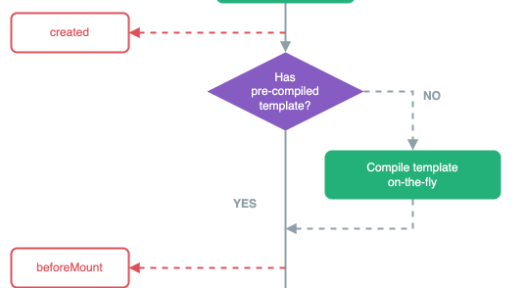
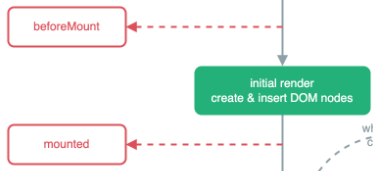
그림출처 : https://vuejs.org/guide/essentials/lifecycle.html


라이프사이클 훅

라이프사이클 훅

lifecycle hook
라이프사이클 훅은 브라우저가 Vue앱을 "실행"할 때

Vue 컴포넌트가 생성되고, DOM에 붙고, 갱신되고, 제거되는 과정 그 각 단계마다 호출되는 함수(훅, hook)
* hook  낚시바늘
진행순서 npm run dev -> local : http://localhost:5173 -> 브라우저 주소 호출
호출방법 Options API Composition API 공통설명
  export default {
  name: 'LifecycleDemo',

  data() {
    return {
      message: 'Hello Vue!',
    }
  },
 beforeCreate() {},
  created() {},
  beforeMount() {},
  mounted() {},
  beforeUpdate() {},
  updated() {},
  beforeUnmount() {}, 
    // Vue 3
  unmounted() {},     
    // Vue 3
  methods: {
    updateMessage() {
      this.message = 'Updated!'
    }
  }
}
</script>
<script setup>
import {
  onBeforeMount, onMounted,
  onBeforeUpdate, onUpdated,
  onBeforeUnmount, onUnmounted
} from 'vue'
onBeforeMount(() => console.log('beforeMount'))
onMounted(() => console.log('mounted'))
onBeforeUpdate(() => console.log('beforeUpdate'))
onUpdated(() => console.log('updated'))
onBeforeUnmount(() => console.log('beforeUnmount'))
onUnmounted(() => console.log('unmounted'))
</script>

or 
export default {
  name: 'LifecycleExample',
  setup() {
    onBeforeMount(() => {
      console.log('beforeMount')
    })
    onMounted(() => {
      console.log('mounted')
    })
    onBeforeUpdate(() => {
      console.log('beforeUpdate')
    })
    onUpdated(() => {
      console.log('updated')
    })
    onBeforeUnmount(() => {
      console.log('beforeUnmount')
    })
    onUnmounted(() => {
      console.log('unmounted')
    })
    return {}
  }
설명 Vue2 부터 사용
vue 내부에서 자동사용
Vue 3 새롭게 도입(권장)
사용자가 직접  사용
 
creation( 생성 ) beforeCreate setup()
: Vue가 Composition API를 통해 개발자가 만든 반응형 상태를 로드하는 함수
값은 return 으로 전달
인스턴스 초기화 전. data, props 사용 불가
Init Options API  
created
: 반응형 API 기반 객체 모두 준비 
this. 접근가능
생성 후. data, props, methods 접근 가능
- 페이지 진입 시 사용자 정보 불러오기, 서버에서 목록 로딩 등
* 일찍 로딩하는게 이득인 데이터
 

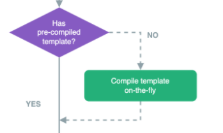
템플릿이 이미 js 변환되었나? 

NO-> 실행중에 템플릿 컴파일
YES -> beforeMount 진행
mounting (연결) beforeMount()

onBeforeMount()
: setup 내부에서 사용
this 사용불가
DOM에 붙기 전. 가상 DOM은 만들어짐

초기 랜더링 & DOM 노드 생성 및 삽입
mounted() onMounted() DOM에 붙은 후. $el, ref 접근 가능
- 차트 그리기, 3rd-party 라이브러리 연동, focus 지정 등 dom 에 의존하는작업
updating(수정)
사용자 사용중 상태 


반응형 데이터가 바뀌면 Vue는 컴포넌트를 다시 렌더링하고, 변경된 부분만 DOM에 패치(수정)합니다.
beforeUpdate() onBeforeUpdate() 반응형 데이터 변경 → DOM 업데이트 직전
updated() onUpdated() DOM 업데이트 완료 후
- 데이터 바뀔 때 UI 애니메이션 트리거 데이터가 갱신된 후 DOM 작업 필요할 때
해제
(unmounting)
beforeUnmount() onBeforeUnmount() 컴포넌트 제거 직전
unmounted() onUnmounted() 컴포넌트 제거 완료 후
- WebSocket 연결 종료, 타이머 해제, 이벤트 제거, 서비스 종료 또는 페이지 이탈 시 정리 작업


반응형

Reactivity APIs

반응형 API 반응형 데이터를 다루기 위한 핵심 함수
호출방법 Options API Composition API 설명
Vue2 부터 사용
vue 내부에서 자동사용
Vue 3 새롭게 도입(권장)
사용자가 직접  사용
코드사용순서 // 1.  import문 없음
export default {

  name: '',       // 컴포넌트 이름
  components: {},// 자식 컴포넌트 
  directives: {},   // 커스텀 디렉티브
  // 2. defineProps, defineEmits
  props: {},    // 부모 받는 데이터
  emits: [],    // 부모 보낼 이벤트
  // 3. provide, inject
  provide() { // 하위 컴포넌트 제공
    return {}
  },
  inject: [],  // 상위 컴포넌트 주입
  //4. data(ref, reactive)
  data() {
    return {}
  },
  // 5. compute
  computed: {},        // 계산된 속성
  // 6. method
  methods: {},         // 메서드(순서)
  // 7. watch
  watch: {},           // 감시자 (순서)
  //8. lifecycle hooks (반응형api 아님)
}
<script setup>
// 1.  import문
import {
  ref, computed, watch, reactive, provide, inject,
  onBeforeMount, onMounted, onBeforeUpdate, onUpdated,
  onBeforeUnmount, onUnmounted
} from 'vue'
// 2. props , emits
const props = defineProps({ msg: String })
const emit = defineEmits(['submitted'])
// 3. provide, inject
provide('theme', 'dark')
const theme = inject('theme')
// 4. ref, reactive
const title = ref('Composition API 예제')
const inputValue = ref('')
const state = reactive({ changed: false })
// 5. compute
const reversed = computed(() => inputValue.value.split('').reverse().join(''))
function submit() {
  emit('submitted', inputValue.value)
  console.log('제출:', inputValue.value)
}
// 6. watch, watchEffect (순서)
watch(inputValue, (n, o) => {
  console.log('변경:', o, '→', n)
  state.changed = true
})
// 7. method, 함수 (순서)
function 함수명() {}
//8. lifecycle hooks (반응형 api 아님)
</script>
ref  data() import { ref } from 'vue'
const count = ref(0)
- 반응형 기본 데이터 타입(숫자, 문자열)
reactive  data() import { reactive } from 'vue'
const state = reactive({
  count: 0,
  name: '홍길동'
})
- 반응형 객체
computed export default {
  name: 'AddressInput',
  data() {
    return {
      gu: '',
      dong: ''
    }
  },
  computed: {
    address: {
      get() {
        return this.gu && this.dong ? `${this.gu} ${this.dong}` : ''
      },
      set(value) {
        const parts = value.trim().split(/\s+/)
        this.gu = parts[0] || ''
        this.dong = parts[1] || ''
      }
    }
  }
}
import { ref, computed } from 'vue'

// 구와 동을 개별 관리
const gu = ref('')
const dong = ref('')

// 구 + 동 조합된 주소
const address = computed({
  get() {
    // 둘 중 하나라도 비어 있으면 빈 문자열
    return gu.value && dong.value ? `${gu.value} ${dong.value}` : ''
  },
  set(val) {
    const parts = val.trim().split(/\s+/) // 공백 기준 분리
    gu.value = parts[0] || ''
    dong.value = parts[1] || ''
  }
})
- 반응형 계산된속성, 읽기전용
1. effect+lazy 관리
변할땜나 실행, 메모리캐시사용 같은메서드 여러번 호출해도 캐싱으로 한번만 호출
2. 기본데이터타입의 조합으로 정의, 해당 값을 변경하려면 set, get 으로 사용. 
watch export default {
  data() {
    return {
      address: '',
      gu: '',
      dong: ''
    }
  },
  watch: {
    address(newVal) {
      const parts
          = newVal.trim().split(/\s+/)
      this.gu = parts[0] || ''
      this.dong = parts[1] || ''
    }
  }
}
<script setup>
import { reactive, watch } from 'vue'

const user = reactive({
  name: '홍길동',
  age: 20
})

watch(user, {
  handler(newVal, oldVal) {
    console.log('사용자 변경됨:', oldVal, '→', newVal)
  },
  deep: true,
  immediate: true,
  flush: 'post'
})
</script>

<template>
  <input v-model="user.name" placeholder="이름" />
  <input v-model="user.age" type="number" placeholder="나이" />
</template>
특정 반응형 데이터의 변화를 감지하여 특정 작업을 수행

1.Deep Watchers
객체 내부 속성까지 감지
- deep :true//깊은감시

2.Eager Watchers
변화 상관없이
감시 시작 시 한 번 즉시 실행

- immediate = true

3. Callback Flush Timing
DOM 업데이트 이후에 실행 ('pre'는 기본값)
 - flush : "post'


handler
옵션 객체 감시를 설정할 때 사용하는 콜백함수


$watch 인스턴스사용 export default {
  data() {
    return {
      count: 0,
      unwatchFn: null
    }
  },
  mounted() {
    // 인스턴스를 저장해서 나중에 중단 가능
    this.unwatchFn = this.$watch(
      'count',
      (newVal, oldVal) => {
        console.log('변경:', oldVal, '→', newVal)

        if (newVal >= 5) {
          console.log('감시 중단')
          this.unwatchFn() // watch 중단
        }
      },
      {
        immediate: true
      }
    )
  }
import { ref, watch } from 'vue'

const count = ref(0)
// 감시 인스턴스를 저장
const stopWatch = watch(count, (newVal, oldVal) => {
  console.log('Count:', oldVal, '→', newVal)

  if (newVal >= 5) {
    console.log('감시 중단됨')
    stopWatch()  // watch 해제
  }
})
성능 관리 필요 없는 감시를 중단해 리소스 절약


*  stopWatch()  
호출이 감시를 중지함. 
watchEffect 없음 import { ref, watchEffect } from 'vue'

const address = ref('')
const gu = ref('')
const dong = ref('')

watchEffect(() => {
  const parts 
      = address.value.trim().split(/\s+/)
  gu.value = parts[0] || ''
  dong.value = parts[1] || ''
})
watch와 비슷
하지만, 내부에서 읽힌 모든 반응형 값 자동 추적


반응형

https://vuejs.org/guide/introduction.html


화면출력 디렉티브

Directive Vue에서 HTML 태그에 특별한 동작을 하도록 지시하는 속성
템플릿 에서 v- 로 시작
문자열 출력 v-html <p v-html="htmlContent"></p> html태그가 처리되어 출력
보완에는 취약
v-text <p v-text="message"></p> 텍스트만 출력, 
{{}} 와 유사 하지만 부분적 변경이 안됨
  참고 : {{}}
 = 머스타시 문법- 수염같다
= 보간문법
= Interpolation
v-text는 해당 태그텍스트 전체를 교체하지만 
일부만 변수처리가능 
v-pre <p v-pre>{{ name }}</p>

출력 : 
<p>{{ name }}</p>
이스케이프
뷰 컴파일러가 뷰 에플리케이션 코드 컴파일 안하고 문자 그대로 출력
1. 더블 중괄호 그대로 필요할 때 사용
2. 성능상 컴파일할 필요 없는 정적인 영역을 건너뛰게 하고 싶을 때 (최적화용)
v-slot <template>
  <div class="card">
    <header>
      <slot name="header">[기본 헤더]</slot>
    </header>
       <footer>
      <slot name="footer">[기본 푸터]</slot>
    </footer>
  </div>
</template>
-------------------------------------------------
<template>
  <CardBox>
    <!-- 이름 있는 슬롯 -->
    <template v-slot:header>
      <h3>📝 커스텀 헤더</h3>
    </template>
    <!-- 또 다른 이름 있는 슬롯 -->
    <template v-slot:footer>
      <small>ⓒ 2025 Vue Inc.</small>
    </template>
  </CardBox>
</template>
<script>
import CardBox from './components/CardBox.vue'
export default {
  components: { CardBox }
}
</script>
자식에 컴포넌트에 name과 함께 지정하여 부모에서 값을 넣음
조건 v-show <p v-show="isVisible">보이는 문장</p> 조건 안맞을때 : display: none
가벼움(빠름)
조건이 자주바뀔때
v-if <p v-if="isLoggedIn">환영합니다</p> 조건 안맞을 때 : <!--v-if-->
무거움(느림)
조건이 자주 변하지 않을때 
v-else-if,
v-else
<p v-if="score >= 90">A</p>
<p v-else-if="score >= 80">B</p>
<p v-else>C</p>
조건이 안맞을때 
<!--v-if-->
<!--v-else-if-->


바인딩 v-bind <img :src="imgUrl"  v-bind:class="black"/>
<input type="text" :value="name" @input="name = $event.target.value" />

HTML 태그 속성(attribute)에 동적으로 연결 
1. v-bind:속성명  으로 사용
2. :속성명 으로 사용
{{}} 로 값을 넣을 수 없음
<template>
  <div>
    <p>진행률: {{ progress }}%</p>
    <progress :value="progress" max="100"></progress>
  </div>
</template>

<script setup>
import { ref } from 'vue'

const progress = ref(30)
</script>
프로그래스 출력
v-model

양방향 
데이터 바인딩 
(Two-way Binding)
<template>
  <div>
    <!-- 이름 입력 -->
    <input v-model="name" placeholder="이름을 입력하세요" />
    <p>입력한 이름: {{ name }}</p>

    <!-- 과일 선택 (드롭다운) -->
    <select v-model="selected">
      <option value="">선택하세요</option>
      <option value="apple">사과</option>
      <option value="banana">바나나</option>
    </select>
    <p>선택한 과일: {{ selected }}</p>

    <!-- 체크박스 그룹 -->
    <p>좋아하는 과일을 모두 선택하세요:</p>
    <label><input type="checkbox" value="apple" v-model="fruits" /> 사과</label>
    <label><input type="checkbox" value="banana" v-model="fruits" /> 바나나</label>
    선택한 과일들: {{ fruits }}

    <!-- 라디오 버튼 그룹 -->
    <p>한 가지 과일만 선택하세요:</p>
    <label><input type="radio" name="fruits2" value="apple" v-model="fruits2" /> 사과</label>
    <label><input type="radio" name="fruits2" value="banana" v-model="fruits2" /> 바나나</label>
    <p>선택한 과일: {{ fruits2 }}</p>

    <!-- 단일 체크박스 -->
    <label>
      <input type="checkbox" v-model="agree" />
      이용약관에 동의합니다
    </label>
    <p>동의 여부: {{ agree ? '동의함' : '동의 안 함' }}</p>
  </div>
</template>

<script setup>
import { ref } from 'vue'

// 입력 상태
const name = ref('')
const selected = ref('')

// 체크박스 그룹
const fruits = ref([]) // 초기 선택 없음
// const fruits = ref(['banana'])  // ← 초기 선택 바나나로 하려면 이 줄 사용

// 라디오그룹
const fruits2 = ref('')  // 예: 초기값 'banana' 가능

// 단일 체크박스
const agree = ref(false)
</script>
양방향 데이터 바인딩 (view ↔ model)
* 얕은복사/참조 주의
input  , textarea, select 처리시 사용. 셋팅값 사용자 선택값 사용. 

내부적 코드
<input v-model="msg" />
<input :value="msg" @input="msg = $event.target.value" />

내부적으로
@change 이벤트를 사용


ref('')  Composition API 방식
IME (Input Method Editor) 에서 주의
- 한글이나 한자처럼 자판에 있는 글자보다 수가 더 많은 문자를 계산&조합하여 입력해주는 소프트웨어

<template>
  <div>
    <input v-model="str" placeholder="문자열을 입력하세요" />
    <p>글자 수: {{ str.length }}</p>
  </div>
</template>

<script setup>
import { ref } from 'vue'
const str = ref('')
</script>
영어는 실시간으로 글자수 길이 사용가능
한글 글자수 출력 불가.(조합해서 작성하는글)
별도 input 이벤트로 function 으로 분리해서 처리할 것. 
부모-자식 양방향 바인딩시 기본수식어 안됨.
컴포넌트 내부에서 처리
하기 수식어 참조
랜더링 v-once <template>
  <div>
    <p v-once>v-once 적용: {{ msg}}</p>
    <p>일반 렌더링: {{ msg }}</p>

    <button @click="changeMsg ">
          메시지 변경
     </button>
  </div>
</template>

<script setup>
import { ref } from 'vue';

const msg  = ref('처음 메시지');

function changeMsg  () {
  msg   .value = '바뀐 메시지';
}
</script>
렌더링 최적화 :
최초 렌더링 이후 다시는 업데이트하지 마라
v-memo <template>
  <ul>
    <li
      v-for="item in items"
      :key="item.id"
      v-memo="[item.name]"
    >
      {{ item.name }}
    </li>
  </ul>

  <button @click="changeOther">다른 항목 변경</button>
</template>

<script setup>
import { ref } from 'vue'

const items = ref([
  { id: 1, name: 'Vue' },
  { id: 2, name: 'React' },
  { id: 3, name: 'Svelte' },
])

function changeOther() {
  items.value[0].name = 'Vue.js' // 첫 번째 항목만 바뀜
}
</script>
조건부로 다시 렌더링
Vue 3.2 이상
v-for 와 같이 써서 일부 값이 바뀔때 데이터 재로딩 하는 로직으로 사용
* 동일 태그에 사용할것 주의
v-for <ul>
  <li v-for="(fruit, index) in fruits" :key="i">
    {{ index }} {{ fruit }}
  </li>
</ul>
data() {
  return {
    fruits: ['사과', '바나나', '포도']
  }
}
v-for와 v-if를 같은 요소에 함께 쓰면 **우선순위는 v-for > v-if** 분리 사용 추천


이벤트
v-on:event  
v-on:click <template>
  <div>
    <button v-on:@click="sayHello($evnet)">인사하기</button>
    <button @click="($event) =>sayHello($evnet)">인사하기</button>
    <h1>{{num}} 번<h1>
  </div>
</template>

<script>
export default {
  data(){
    return {
      num:0,
    };
  },
  methods: {
    sayHello(e) {
      alert("안녕하세요!");
      console.log(e)
      this.num = this.num +1;
    }
  }
}
</script>

1.  정식 문법 
 v-on:click="sayHello"
2.  축약형 
 @click="sayHello"

3. 그외 이벤트
@click 클릭 이벤트 @click="함수명"
@dblclick 더블 클릭 @dblclick="함수명"
@mouseenter 마우스 진입 @mouseenter="onHover"
@keyup 키보드 키 누름 @keyup.enter="submit"
@submit 폼 제출 <form @submit.prevent="onSubmit">

4. 이벤트 객체
@click="sayHello($evnet)"
@click="($event) =>sayHello($evnet)"
성능은 위에것이 좋음, 타입안정성은 아래것이 높음

5. 반응성(Reactivity)
데이터가 바뀌면 자동으로 화면이 업데이트 되는 시스템 

cf) Vue 컴포넌트스크립트 (script) 내에서 data, methods 속성접근시this로 호출
v-on:input <textarea @input="memo = $event.target.value"></textarea> 실시간 입력 @input
v-on:change <!-- 체크박스 그룹 --><input @change="id = $event.target.value" />
  <select @change="selected = $event.target.value">
    <option value="">선택하세요</option>
    <option value="apple">사과</option>
    <option value="banana">바나나</option>
  </select>
입력중 포커스를 잃을때 실행 @change
파일 처리도 @change로 처리
<template>
  <div>
    <input type="file" @change="handleFileChange" />
    
    <div v-if="file">
      <p>파일명: {{ file.name }}</p>
      <p>파일 크기: {{ (file.size / 1024).toFixed(2) }} KB</p>
      <p>파일 타입: {{ file.type }}</p>
    </div>
  </div>
</template>

<script setup>
import { ref } from 'vue'

const file = ref(null)

function handleFileChange(event) {
  const selected = event.target.files[0]
  file.value = selected || null
}
</script>
매서드  
vs 인라인 핸들러
매서드핸들러  <button @click="handleClick">Click</button>
methods: {
  handleClick(event) {
    console.log(event);
  }
}
* event 는 데이터로 넘겨줌
인라인핸들러 js 코드 그대로 사용, 변수, 함수 호출시 this 필요없음

<input @change="id = $event.target.value" />
<button @click="sayHello('Vue')">Say Hello</button>
<button @click="isActive ? doSomething() : doSomethingElse()">Click</button>
<button @click="(event) => handleClick(event)">Use Arrow Function</button>
이벤트 수식어

modifier
디렉티브에 붙는 특수한 동작 제어자
@이벤트명.수식어1.수식어2="함수"

1. 수식어 
.capture 캡처링 단계에서 실행 <div @click.capture="capture">...</div>

2. 동시실행
<button @click.prevent.stop="handleClick">전파X & 이동X</button>

3.  prevent, stop 은 사용후 키확인
.prevent   <button @click.prevent.ctrl="handleClick">...✔</button>
.stop <button @click.stop.ctrl="handleClick">...✔</button>

참고 : v-model 의 수식어는 사용자가 만들어등록
.prevent  <a href="#" @click.prevent="go">링크</a>

기본 동작 막음 
event.preventDefault(); 동일
ex) a , form 태그
.self <div @click.self="selfOnly">...</div> 자기 자신에게만 실행 
- 자식요소도 막음(캡쳐링도 막음)

if (event.target === event.currentTarget) {
selfOnly(); // 클릭된 요소가 바로 이 div일 때만 실행
} 동일
.stop <div @click.stop="stopClick">...</div> 이벤트 전파 막음 

event.stopPropagation(); 동일
- 자식요소는 확성화
.passive <div @scroll.passive="handleScroll">...</div>
 스크롤 성능에 중요한 이벤트  wheel, touchmove
<div @wheel.passive="handleWheel" />
<div @touchmove.passive="handleTouchMove" />

handleScroll 안에서 event.preventDefault() 안 쓸게 = 스크롤 법벅임 방지

element.addEventListener('scroll', handleScroll, { passive: true })  // 스크롤 버벅임방지


cf) wheel 마우스 휠 입력
touchmove 모바일 스크롤 최적화
.once  <button @click.once="init">...</button> 한 번만 실행 - 일회용
키보드
수식어

시스템
수식어
<button @click.ctrl="ctrlClick"> 클릭 +ctrl키</button>
<button @keydown.ctrl. shift.alt ="ctrlClick">Ctrl and shift and alt  키</button>
<button 
  @keydown.ctrl="onKey"
  @keydown. shift ="onKey"
  @keydown.alt="onKey"
> Ctrl or shift or alt  </button>
<input @keydown.enter="submitForm" />
<div @keydown.left="moveLeft" @keydown.right="moveRight"></div>
<div @keydown.esc="closeModal"></div>
1. event.key 기반
2. event.code 로 키 확인가능
3. .은 and 조건
각각 선언시 or 조건. 

.ctrl Ctrl 키가 눌린 상태에서 @keydown.ctrl
.shift Shift 키가 눌린 상태에서 @keydown.shift
.alt Alt 키가 눌린 상태에서 @keydown.alt
.meta ⌘ Command (Mac), ⊞ Win (Windows)
.enter Enter 키
.tab Tab 키
.delete Delete 및 Backspace 키
.esc / .escape Escape 키
.space Spacebar (스페이스)
.up, .down, .left, .right 방향키
.home, .end, .pageup, .pagedown 탐색 키
.insert Insert 키
.exact  <button @click.ctrl.exact="handle">✔ 권장</button> *(순서주의)키보드 키가 단독으로 눌렀을때
.exact 는 키확인후 사용 
v-model

<template>
  <div>
    <h2>부모 컴포넌트</h2>
    <!-- v-model:message 사용 + 수식어처럼 `.capitalize` -->
    <MyInput v-model:message.capitalize="text" />
    <p>입력된 값: {{ text }}</p>
  </div>
</template>

<script>
import MyInput from './components/MyInput.vue'

export default {
  components: { MyInput },
  data() {
    return {
      text: ''
    }
  }
}
</script>
-------------------------------------------------------------------
<template>
  <div>
    <input :value="modelValue" @input="handleInput" />
  </div>
</template>

<script>
export default {
  props: {
    modelValue: String,
    modelModifiers: {
      type: Object,
      default: () => ({})
    }
  },
  emits: ['update:modelValue'],
  methods: {
    handleInput(event) {
      let value = event.target.value
      if (this.modelModifiers.capitalize) {
        value = value.charAt(0).toUpperCase() + value.slice(1)
      }
      this.$emit('update:modelValue', value)
    }
  }
}
</script>


v-model
부모 -자식 컴포넌트 사용 시 
이벤트 수식어와 다르게(해당 수식어는 자동으로 있는 것이 맵핑 되는게 아니라)새로 작성해야함


반응형
NPM 패키지 생성시 스캣폴드(뼈대)
NPM 으로 생성 npm create vue@latest
프로젝트명 . (현재폴터)
패키지명 (현재폴더명)
npm  install

Scaffold(뼈대)  형태로 만들어짐 
생성시 질문
Project name (target directory): 현재폴더는 "." 
Package name :  현재폴더명 

Select features to include in your project: (↑/↓ to navigate, space to select, a to      : 추가기능선택
toggle all, enter to confirm)
│  ◻ TypeScript
│  ◻ JSX Support
│  ◻ Router (SPA development)
│  ◻ Pinia (state management)
│  ◻ Vitest (unit testing)
│  ◻ End-to-End Testing
│  ◻ ESLint (error prevention)
│  ◻ Prettier (code formatting)

 Select experimental features to include in your project: (↑/↓ to navigate, space toselect, a to toggle all, enter to confirm)   : 미리체험기능

│  ◻ Oxlint (experimental)
│  ◻ rolldown-vite (experimental)
 Skip all example code and start with a blank Vue project?
│  ○ Yes / ● No  // 기본값 NO, 기본예제 포함
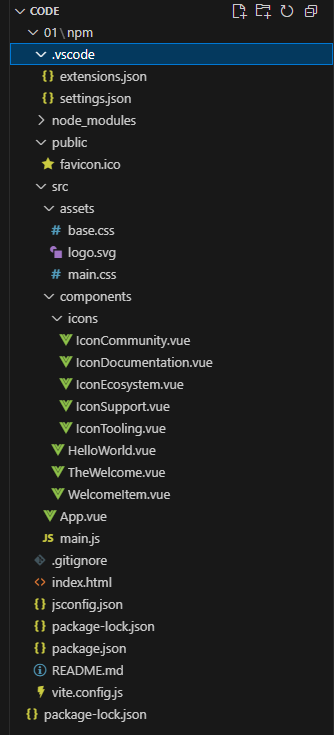
.vscode\ VSCode 편집기 설정을 저장하는 폴더 
.vscode\
extensions.json
추천 확장 목록
.vscode\
settings.json
프로젝트별 편집기 설정
node_modules npm install 시 설치
node js 패키지
public 정적리소스 저장 
번들링 필요없는 파일
src\ 애플리케이션 소스코드가 위치하는 핵심 폴더
src\
assets
이미지, css, 폰트 - 동적리소스 저장
src/
componets
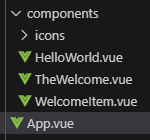
컴포넌트(확장자 .vue 로 끝나는파일) 저장
src/
App.vue
root 컴포턴트,  .vue 확장자 싱글파일 컴포턴트
src/
main.js
어플리케이션 진입점, 설정초기화
.gitignore  
index.html 최상단 HTML 파일
package.json 프로젝트의 메타정보 + 의존성 + 스크립트 명세
package-lock.json 설치된 정확한 버전 정보가 기록됨 협업 시 패키지 버전 고정 용도
vite.config.js 비트관련설정
구동 npm run dev
   ↓
Vite 개발 서버 실행
   ↓
브라우저가 http://localhost:5173 에 접속  - 최초 요청시&파일변경시 컴파일 하고 이후에는 캐시사용
   ↓
(index.html 요청 → main.js 요청 → App.vue 등 Vue 컴포넌트 요청)
   ↓
 Vite가 해당 .vue 파일을 JS 모듈로 "컴파일"
   ↓
변환된 JS를 브라우저에 전송
   ↓
브라우저에서 JS 코드 실행됨 (Vue 런타임 작동)
   ↓
라이프사이클 훅이 실행됨 (mounted 등)
npm run <scripts>
package.json
{
  "name": "npm",
  "version": "0.0.0",
  "private": true,
  "type": "module",
  "engines": {
    "node": "^20.19.0 || >=22.12.0"
  },
  "scripts": {
    "dev": "vite",
    "build": "vite build",
    "preview": "vite preview"
  },
  "dependencies": {
    "vue": "^3.5.18"
  },
  "devDependencies": {
    "@vitejs/plugin-vue": "^6.0.1",
    "vite": "^7.0.6",
    "vite-plugin-vue-devtools": "^8.0.0"
  }
}
npm run dev
-> package.json 의  scripts 기준으로 실행
dev  실행시 vite(비트) 명령어가 실행됨. 
\vite.config.js
import { fileURLToPath, URL } from 'node:url'

import { defineConfig } from 'vite'
import vue from '@vitejs/plugin-vue'
import vueDevTools from 'vite-plugin-vue-devtools'

export default defineConfig({
  plugins: [
    vue(),
    vueDevTools(),
  ],
  resolve: {
    alias: {
      '@': fileURLToPath(new URL('./src', import.meta.url))
    },
  },
})
vite 와 관련된 설정을 모아옴
index.html
<!DOCTYPE html>
<html lang="">
  <head>
    <meta charset="UTF-8">
    <link rel="icon" href="/favicon.ico">
    <meta name="viewport" content="width=device-width, initial-scale=1.0">
    <title>Vite App</title>
  </head>
  <body>
    <div id="app"></div>
    <script type="module" src="/src/main.js"></script>
  </body>
</html>

#app 지정
main.js 호출
main.js 
import './assets/main.css'

import { createApp } from 'vue'
import App from './App.vue'

createApp(App).mount('#app')
App.vue 파일을 불러와 #app 와 연결
App.vue
<script setup>
import HelloWorld from './components/HelloWorld.vue'
import TheWelcome from './components/TheWelcome.vue'
</script>

<template>
  <header>
    <img alt="Vue logo" class="logo" src="./assets/logo.svg" width="125" height="125" />

    <div class="wrapper">
      <HelloWorld msg="You did it!" />
    </div>
  </header>

  <main>
    <TheWelcome />
  </main>
</template>

<style scoped>
header {
  line-height: 1.5;
}

.logo {
  display: block;
  margin: 0 auto 2rem;
}

@media (min-width: 1024px) {
  header {
    display: flex;
    place-items: center;
    padding-right: calc(var(--section-gap) / 2);
  }

  .logo {
    margin: 0 2rem 0 0;
  }

  header .wrapper {
    display: flex;
    place-items: flex-start;
    flex-wrap: wrap;
  }
}
</style>


Vue.js 코드

<script setup>
import HelloWorld from './components/HelloWorld.vue'
import TheWelcome from './components/TheWelcome.vue'
</script>

<template>
  <header>
    <img alt="Vue logo" class="logo" src="./assets/logo.svg" width="125" height="125" />

    <div class="wrapper">
      <HelloWorld msg="You did it!" />
    </div>
  </header>

  <main>
    <TheWelcome />
  </main>
</template>

<style scoped>
header {
  line-height: 1.5;
}

.logo {
  display: block;
  margin: 0 auto 2rem;
}

@media (min-width: 1024px) {
  header {
    display: flex;
    place-items: center;
    padding-right: calc(var(--section-gap) / 2);
  }

  .logo {
    margin: 0 2rem 0 0;
  }

  header .wrapper {
    display: flex;
    place-items: flex-start;
    flex-wrap: wrap;
  }
}
</style>
SFC Single file component
(= 컴포넌트 라고 도 불림)
확장자가 .vue 로 끝나는 파일
ex) App.vue
구성 <script>  // 스크립트 태그 영역
JavaScript
</script>
<template> // 템플릿 태그 영역
HTML 
</template>
<style> // 스타일 태그 영역
CSS
</style>
** 반드시 하나의 템플릿 태그영역은 있어야함
데이터 바인딩
텍스트 보간
<script>
  export default {
    data : function(){
      return {
        message : "Hello",
      }
    }
  }
</script>
<template> 
<h1>{{message}}</h2>
<h1>{{ (3*3) /2 === 0 ? "짝수" : "홀수" }}</h1>
</templage>
단축 메서드명   export default {
    data (){
      return {
        message : "Hello",
      }
    }
  }
options API
- 초보자, 소규모
data, methods, computed 등으로 옵션별 구분
예 
<script>
export default {
  data() {
    return {
      count: 0
    };
  },
  methods: {
    increment() {
      this.count++;
    }
  }
}
</script>

<template>
  <div>
    <p>숫자: {{ count }}</p>
    <button @click="increase">+1</button>
  </div>
</template>
composition API
- 복잡한로직, 재사용, 신기술
setup() 함수 안에 모두 작성
<script setup>
import { ref } from 'vue';

const count = ref(0);
const increment = () => {
  count.value++;
};
</script>
반응형

실전을 위한 요약

1. vue 사용시 npm 을 계속 사용 >> node.js 설치 필수 
     node -v
2. vue.js 폴더로 이동 의존성 패키지 설치 
     npm install 
3. 개발 폴더 실행 
    npm run dev
4. 배포시
  npm run build


비쥬얼 스튜디오 코드  왼쪽
상단
익스플로러
검색
버전관리
디버깅
익스텐션 (=플러그인) 
  - Material Theme => 기본기능으로 변경 테마 선택 
  - Material Icon Theme => 기본기능으로 변경 아이콘 선택
  - Auto Rename Tag : html 의 뒤 태그를 자동으로 같이변경
  - HTML to CSS autocompletion : html을 css에서 찾기쉽게
  - HTML CSS Support : css 를 HTML 에서 찾기쉽게
  - CSS Peek : 윈도우 ctrl 누르면 해당 css 바로이동
  - Autoprefixer : css3 속성 + setting > command 팔레트  autoprefixer 사용시 젠더 프릭픽서가 자동으로 붙음
  - bracket pair colorizer2 => 기본기능으로 변경
  - indent-rainbow : 들여쓰기 공간 컬러플하게
  - live server : html 변경내용이 새로고침 안해도 되게
                  setting > command 팔레트  > live server : open with live server
  - prettier - code fomatter : 코드 정렬
              setting > default formatter > prettier
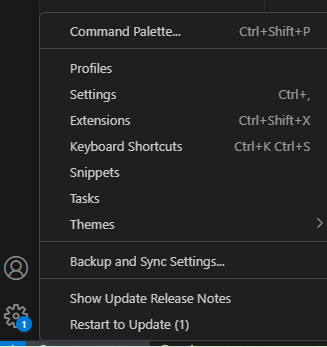
왼쪽 하단
사용자
셋팅
- command 팔레트 : 비주얼 스튜디오 명령어 바로실행 
- settings : 폰트 외 환경 
작업폴더 지정 익스플로러 > open folder
HTML 기본 작성 ! + tab
자동정렬 익스텐션 prettier - code fomatter :설치
setting > tab size 2
setting > default formatter  prettier
setting > format on save  선택

backup and sync settings 클릭
vue 사용설정 익스텐션  Vue (Official) ,Vue VSCode Snippets(코드조각) 설치
상단메뉴 터미널 > new 터미널 1. vue cli 다운
npm install -g @vue/cli      
... 맥은 sudo 앞에 추가. 

2. npm 설치 확인 (node 설치시 설치됨,  node 16버전이상)
> npm -v 
11.0.0
> node -v
v22.13.0


CDN Content Delivery Network https://ko.vuejs.org/  문서 > 빠른시작

    <script src="https://unpkg.com/vue@3/dist/vue.global.js"></script>

    <div id="app">{{ message }}</div>

    <script>
      const { createApp, ref } = Vue;

      createApp({
        setup() {
          const message = ref("Hello vue!");
          return {
            message,
          };
        },
      }).mount("#app");
    </script>
장점 1. script로 쉽게 라이브러리 설치
2. 라이브러리 웹캐시로 다음방문시 빠름
단점  1. 라이브러리 버전관리 어려움 , 의존성관리 어려움
2. CDN 서버 다운되면 , 뷰 js 애플리케이션도 사용불가
3. HTML 파일과 함께 작성되어 규모가 크면 어려움
NPM Node Package Manager npm init vue@latest    // vue js 프로젝트 스캣폴딩
프로젝트명 "." 입력시 현재폴더이름
패키지이름 폴더이름 같게 권장 


npm install     // package.json 써있는것 node_modules 에 설치
npm run dev


장점 1. 패키지 설치 관리 쉬움
2. SFC 사용 SPA 구현 수비다. 
3. 뷰 공식 권장
단점 기본설치 파일이 있어 작은규모 불필요 
Vue CLI Command Line Interface npm install -g @vue/cli
vue --version
vue create vue-cli       //  vue create .      << 현재폴더 설치

vue 버전 선택 설치 가능. 
더이상사용안함  NPM 방법으로 사용할것.  2.x 버전일때 많이 사용된 설치방법 


반응형
DOM  Document Object  Model  문서 객체 모델(The Document Object Model, 이하 DOM) 은 HTML, XML 문서의 프로그래밍 interface 이다.  - 표준화(W3C)
출처 : https://developer.mozilla.org/ko/docs/Web/API/Document_Object_Model/Introduction


document.getRootNode()  -> #document
document.childNodes[1].childNodes[1].textContent
document.querySelector('h1')

BOM  Browser Object Model BOM은 웹 브라우저가 제공하는 객체들

DOM (문서 객체 모델): 웹 페이지의 내용과 구조를 제어 BOM (브라우저 객체 모델): 웹 페이지가 표시되는 브라우저 환경을 제어
BOM (브라우저 객체 모델): 웹 페이지가 표시되는 브라우저 환경을 제어
window 
window.open()   == (생략가능)  open()
window의 하위객체 document , navication .....


출처 : https://en.wikipedia.org/wiki/Browser_Object_Model
window  document DOM
navigator 브라우저의 정보 (버전, 플랫폼, userAgent 등)

navigator.geolocation.getCurrentPosition(
  function(pos) {
    console.log("위도:", pos.coords.latitude);
    console.log("경도:", pos.coords.longitude);
  },
  function(err) {
    console.error("에러 발생:", err.code, err.message);
  }
);
location 현재 URL 정보 및 주소 이동 기능
history 사용자의 방문 기록을 제어 (back(), forward() 등)
screen 사용자의 화면 해상도, 색상 정보 등
COM  Css Object Model    
js태그

과거
1. button  등록후 js 실행
<button>버튼<button>
<script type="text/javascript" async="" src="/index.gtm.min.js"></script>

2. 이벤트 실행 
- DOMContentLoaded 는 HTML 완전히 파싱되었을때 바로 실행 추천 onload 보다 이미지, 리소스 기다리지 않아 더 빠름
- window.onload = function () {
   console.log("DOM이 모두 준비되었습니다!");
};
-  document.addEventListener("DOMContentLoaded", function () {
  console.log("DOM이 모두 준비되었습니다!");
});

defer (일반적사용) HTML5 비동기로 js 코드 가져옴 = Html 과 병렬로 가져옴 , 실행은 HTML 파싱후 실행(DOMContentLoaded 직전 ) <script src="script.js" defer></script>
async HTML5 비동기로 js 코드 가져옴 = Html 과 병렬로 가져옴 , 실행은 가져오자마자 실행 - HTML 로딩이 중지됨
<script src="script.js" async></script>
this 누구에 의해 호출되었는지
기본호출 기본값 전역에서
console.log(this === window);  // 브라우저 환경에서는 `window` 객체
기본함수에서
console.log(this); //  브라우저 환경에서는 `window` 객체
객체 메서드안 const obj = {
  name: "hello",
  sayHi: function () {
    console.log(this.name);
  }
};
const f = obj.sayHi.bind(obj);
f(); // 👉 "hello"
람다식 const obj = {
  name: "hi",
  sayHi: () => {
    console.log(this.name);
  }
};
obj.sayHi();   //undefined
strict 모드
(엄격모드 활성화시)
"use strict";

function show() {
  console.log(this);  // undefined
}
show();
bind bind 는 최초 1번만 됨. function sayName() {
  console.log(this.name);
}

const person1 = { name: "Alice" };
const person2 = { name: "Bob" };

const bound1 = sayName.bind(person1);   // this → person1
const bound2 = bound1.bind(person2);    // ❌ 무의미, 여전히 person1

bound1(); // Alice
bound2(); //Alice


API Application Programming Interface 응용프로그램 간의 요청과 응답을 주고받기 위한 약속 (= 인터페이스)

- 함수 / 메서드 (브라우저 API, 라이브러리)
- HTTP URL 호출 (REST API, Web API)
- SDK (앱용 API 모음)

- Private API
- Public API 
동기/비동기 동기  기다리는것
blocking
단순하나 업무프로새스 단순   ~ blocking
비동기 기다리지않는것
Non- blocking
효율적이나 업무프로세스가 복잡해짐
프론트엔드/백엔드 프론트엔드 사용자 보이는영역
백엔드 사용자 보이지 않는 영역


이벤트 전파 브라우저 body > main > div > p > span  형태일때 
이벤트흐름은 최상위 -> 최하위 -> 최상위  로 전파 
캡쳐링  최상위 -> 타겟 body → main  →  div → p → span 

document.addEventListener('click', function(event) {
  console.log('* ' + event.eventPhase + ' - capturing span 단계');
}, true);   < 끝에 true 시 캡쳐링

  * event.eventPhase
         1: 
Capturing phase, 2: Target phase, 3: Bubbling phase
버블링  타겟 -> 최상위 span → p → div → main → body
event.stopPropagation() 이벤트 전파 중단
event.preventDefault(); 폼 제출 막음 ex) a 태그 이동 막기, form 제출막기


JS 함수 반복/변형 forEach() 각 요소에 대해 함수 실행 arr.forEach(x => console.log(x))
map() 배열 변형 → 새 배열 반환 arr.map(x => x * 2)
filter() 조건에 맞는 요소만 추출 arr.filter(x => x > 2)
reduce() 누적 계산 (합계 등) arr.reduce((a, b) => a + b, 0)
  정렬/변환 sort() 정렬 (문자 기준, 숫자는 주의) arr.sort((a, b) => a - b)
reverse() 배열 반전 arr.reverse()
join() 문자열로 변환 arr.join(", ")
toString() 문자열 변환 arr.toString()
  탐색 조회 관련 includes() 값이 있는지 확인 arr.includes(3)
indexOf() 처음 등장 위치 arr.indexOf(3)
lastIndexOf() 마지막 등장 위치 arr.lastIndexOf(3)
find() 조건에 맞는 첫 요소 arr.find(x => x > 5)
findIndex() 조건에 맞는 첫 인덱스 arr.findIndex(x => x > 5)
some() 조건 하나라도 만족 arr.some(x => x < 0)
every() 모든 요소가 조건 만족
  생성 /변형 push() 배열 끝에 추가 arr.push(4)
pop() 배열 끝 제거 arr.pop()
unshift() 배열 앞에 추가 arr.unshift(0)
shift() 배열 앞 제거 arr.shift()
concat() 배열 병합 arr1.concat(arr2)
slice() 배열 일부 복사 arr.slice(1, 3)
splice() 배열 추가/삭제/변경 arr.splice(1, 2, "x")
fill() 배열을 특정 값으로 채움 arr.fill(0)
flat() 중첩 배열을 평탄화 [1,[2,[3]]].flat(2)
  길이/구조 length 배열 길이 arr.length
Array.isArray() 배열인지 확인 Array.isArray(arr)
Array.from() 유사 배열 → 진짜 배열 Array.from("hello")
Array.of() 개별 값 → 배열 생성 Array.of(1, 2, 3)


모듈시스템 모듈 분리된 하나의 파일 = 독립된 기능을 갖는 코드 조각
정의 코드 조각을 정의하고 불러오는 규칙(시스템)
없을때 <script src="a.js"></script>
<script src="b.js"></script>
a.js   
     number = 10 
b.js     
      number = 20
출력시 늦게 정의된 number =20 이 출력됨
있을때 

ES6 (ECMAScript 2015)
<script type="module" src="a.js"></script>
<script type="module" src="b.js"></script>
a.js 
     var number = 10;
     export default  number;
b.js 
     var number = 20;
     export default  number;
<script type="module">
import a_number from './a.js';
import b_number from './b.js';
console.log('a_number: ', a_number);
console.log('b_number: ', b_number);
</script>
종류 AMD Asynchronous Module Definition
설명: 비동기적으로 모듈을 로딩하는 방식. 주로 브라우저 환경에서 사용됨.
UMD Universal Module Definition
설명: AMD와 CommonJS를 모두 지원하는 범용 모듈 정의 방식.
ES Module
- ES6(ES2015) 에 도입된 js 방식
ECMAScript 6
설명: ES6(ECMAScript 2015)에서 도입된  JavaScript의 여섯 번째 버전. 모듈, 클래스, let/const 등 많은 기능이 도입됨.
math.js 
  const perfectScore = 100;
  export { perfectScore }; 
  export const sum = (num1, num2) => {
    return num1 + num2;
  };
  const avg = (num1, num2) => {
    return (num1 + num2) / 2;
  };
export default avg   // export default { 여러개 입력가능 }  

index.js 
  import { perfectScore, sum} from './math.js';
  import avg2 from './math.js';
  console.log('perfectScore: ', perfectScore);
  console.log('sum: ', sum(80, 10));
  console.log('avg: ', avg2(80, 90));

index.js 
  import * as math from './math.js';
  console.log('perfectScore: ', math.perfectScore);
  console.log('sum: ', math.sum(80, 10));
  console.log('avg: ', math.avg(80, 90));
CommonJS Node.js에서 사용되는 동기 방식 모듈 시스템.
math.js 
  exports.perfectScore = 100;
  exports. sum = (num1, num2) => {
    return num1 + num2;
  };
  const avg = (num1, num2) => {
    return (num1 + num2) / 2;
  };
module.export = { avg  };


index.js - 전개구문
  const { perfectScore, sum, avg } = require( './math.js' );
  console.log('perfectScore: ', perfectScore);
  console.log('sum: ', sum(80, 10));
  console.log('avg: ', avg2(80, 90));

index.js 
  const math = require( './math.js' );
  console.log('perfectScore: ', math.perfectScore);
  console.log('sum: ', math. sum(80, 10));
  console.log('avg: ', math. avg2(80, 90));
ES Module for NodeJS NodeJS 버전 13.2부터 ES모듈 시스템에 대한 정식 지원
package.json → "type": "module" 선언시 동일하게 사용가능


NPM Node Package Manager 패키지 관리자
모듈을 을 저장해두었다 사용 ex) npm install 모듈명
node.js 설치사용
라이브러리 조회  : npmjs.com    https://www.npmjs.com/package/dayjs
node.js  javascript 런타임 환경 - 백엔드 어플리케이션
NVM Node Version Manager
https://github.com/coreybutler/nvm-windows/releases 설치 
nvm version

nvm install 18.17.1     # 원하는 버전 설치
nvm use 18.17.1         # 해당 버전 사용 설정
nvm list available  설치가능 목록
nvm list                # 설치된 버전 목록 보기
nvm ls 
nvm uninstall  버전 
nvm current          현재버전
nvm use 버전         사용버전 이동
사용 package.json 프로젝트 정보 갖고 있는파일, 의존된 라이브러리 관리( dependencies )
cf)
하기 nodejs cmd 입력으로도 자동으로 만들어줌
npm init 
npm install dayjs 
{
  "name": "learn_npm",   // 프로젝트 이름
  "version": "1.0.0",   // 주로 3단계버전 많이사용
  "description" : "프로젝트 설명",
  "keywords" : "검색시 참조",
  "private": true ,//  npm 검색 거부 
  "author": "작성자",
  "main": " index.js ",
  "scripts": {
    "start": "hello worldhello worldhello world",   // 명령어 미리작성사용
    "test": "echo \"Error: no test specified\" && exit 1"
  },
  "license": "ISC",
  "dependencies": {   // 프로젝트 사용모듈 기술
    "dayjs": "^1.10.8"
  },
  "devDependencies": {   // 개발할때만 사용
    "moment": "^2.29.1"
  }
}
index.js const dayjs = require('dayjs');

console.log(dayjs('2019-01-25').format('[YYYYescape] YYYY-MM-DDTHH:mm:ssZ[Z]'));
package-lock.json 프로젝트에 설치된 모듈들의 의존성 트리기록
node_modules npm 으로 받은 것이 들어감 
명령어 패키지 설치 관련 npm init package.json 생성 (질문에 따라)
npm init -y package.json 기본값으로 자동 생성
npm install 또는 npm i package.json에 명시된 의존성 설치
npm install <패키지명> 패키지 설치 후 dependencies에 등록
npm install <패키지명> --save-dev 개발용 의존성으로 설치 (devDependencies)
npm install <패키지명>@버전 특정 버전 설치 예: npm install dayjs@1.10.8
npm install -g <패키지명> 전역(global)으로 패키지 설치
패키지 제거 및 업데이트 npm uninstall <패키지명> 패키지 제거
npm update 모든 의존성 업데이트
npm outdated 오래된 패키지 확인
스크립트 실행 npm run <스크립트명> package.json의 scripts 항목 실행
npm start scripts.start 실행 (기본 스크립트)
npm test scripts.test 실행
기타 유용한 명령어 npm list 현재 설치된 패키지 목록
npm list -g --depth=0 전역 설치 패키지 (1단계 깊이만)
npm config list npm 설정 보기
npm cache clean --force npm 캐시 정리
npx <명령어> 설치하지 않고 1회 실행 (예: npx create-react-app)
설치 전역설치 npm install -g 패키지명
커맨드라인 도구 
지역설치 npm install 패키지명
특정프로젝트에만 필요, 배포할 앱의 종속성
버전 시멘틱 버저닝
(Semantic Versioning)
MAJOR: 기존 사용자 코드를 깨뜨릴 수 있음
MINOR: 새로운 기능이지만 기존 코드는 잘 돌아감
PATCH: 작고 안정적인 버그 수정

1.2.3 정확히 1.2.3만 설치됨 고정 버전
~1.2.3 >=1.2.3 <1.3.0 PATCH만 허용 (버그 수정만)
^1.2.3 >=1.2.3 <2.0.0 MINOR + PATCH 허용 (기능 추가까지)

참고 ~(틸드) ^(캐럿)


Webpack 여러 개의 자바스크립트/리소스 파일들을 하나의 번들 파일로 묶어주는 도구
운영 배포시 웹팩에 지정한이름으로 생성되는 파일 ex) bundle.js 만 배포하여 사용

npm install --save-dev webpack webpack-cli
  "devDependencies": {
    "webpack": "^5.92.1",
    "webpack-cli": "^5.1.4"
  }
코드 작성후 
npx webpack 실행
사용이유 모듈이 여러개면 속도가 늦어짐
브라우저에서 모듈번들러로 하나의 모듈로 묶어(번들링) 배포
사용 my-webpack-app/
├── src/
│   ├── a.js
│   ├── b.js
│   └── index.js
├── dist/
│   └── index.html
├── webpack.config.js
└── package.json

src/a.js
  export const a = '🍎 Apple';
src/b.js
  export const b = '🍌 Banana';
webpack.config.js const path = require('path');

module.exports = {
  entry: './src/index.js',
  output: {
    filename: 'main.js',
    path: path.resolve(__dirname, 'dist'),
  },
  mode: 'development'
};

src/index.js import { a } from './a.js';
import { b } from './b.js';

console.log('Module A:', a);
console.log('Module B:', b);
index.html   <body>
    <h1>Open Console</h1>
    <script src="main.js"></script>
  </body>


  원본 const original = {
  name: '홍길동',
  info: {
    age: 30
  }
};
js 복사 얕은 복사 Shallow Copy
쉘로우 카피
객체 최상위 속성만 복사 
중첩된 객체는 참조만 복사
하위는 값 변경시 원본영향 있음
- const copy = Object.assign({}, original);
- const copy = { ...original };
- 배열 : const copy = arr.slice(); const copy = [...arr];


const shallowCopy = { ...original };  //전개연산자

shallowCopy.name = '이몽룡';           // ✅ name은 독립적으로 바뀜
shallowCopy.info.age = 40;            // ⚠️ 내부 객체(info)는 공유됨

console.log('shallowCopy:', shallowCopy);

original:     { name: '홍길동', info: { age: 40 } }
shallowCopy:  { name: '이몽룡', info: { age: 40 } }
  깊은 복사 Deep Copy 하위는 값 변경시 원본영향 없음
- const deepCopy = JSON.parse(JSON.stringify(original));
- cloneDeep  라이브러리
     import cloneDeep from 'lodash/cloneDeep';
     const deepCopy = cloneDeep(original);

const deepCopy = JSON.parse(JSON.stringify(original));

deepCopy.name = ' 이몽룡 ';             // ✅ 독립적
deepCopy.info.age = 40 ;              // ✅ 내부 객체도 독립적

console.log('original:', original);
console.log('deepCopy:', deepCopy);

original:  { name: '홍길동', info: { age: 30 } }
deepCopy:  { name: ' 이몽룡 ', info: { age: 40 } }
반응형

[제 I부 – 찬양]

원문 : Te Deum laudamus  
발음 : 테 데움 라우다무스  
단어뜻 : Te(당신을) Deum(하나님을) laudamus(우리는 찬양합니다)  
해석 : 우리는 당신, 하나님을 찬양합니다  

원문 : te Dominum confitemur  
발음 : 테 도미눔 콘피테무르  
단어뜻 : te(당신을) Dominum(주님으로) confitemur(고백합니다)  
해석 : 우리는 당신을 주님으로 고백합니다  

원문 : Te aeternum Patrem  
발음 : 테 에테르눔 파트렘  
단어뜻 : Te(당신을) aeternum(영원하신) Patrem(아버지로)  
해석 : 당신을 영원하신 아버지로  

원문 : omnis terra veneratur  
발음 : 옴니스 테라 베네라투르  
단어뜻 : omnis(온) terra(땅이) veneratur(경배합니다)  
해석 : 온 땅이 당신을 경배합니다  

원문 : Tibi omnes Angeli  
발음 : 티비 옴네스 안젤리  
단어뜻 : Tibi(당신께) omnes(모든) Angeli(천사들)  
해석 : 모든 천사들이 당신께  

원문 : tibi caeli et universae Potestates  
발음 : 티비 체일리 에트 우니베르사에 포테스타테스  
단어뜻 : tibi(당신께) caeli(하늘들과) et(그리고) universae(온) Potestates(권세들)  
해석 : 하늘과 모든 권세들이 당신께  

원문 : Tibi Cherubim et Seraphim  
발음 : 티비 케루빔 에트 세라핌  
단어뜻 : Tibi(당신께) Cherubim(케루빔) et(그리고) Seraphim(세라핌)  
해석 : 케루빔과 세라핌이 당신을  

원문 : incessabili voce proclamant  
발음 : 인체사빌리 보체 프로클라만트  
단어뜻 : incessabili(끊임없는) voce(목소리로) proclamant(선포합니다)  
해석 : 끊임없는 목소리로 선포합니다  

원문 : Sanctus, Sanctus, Sanctus  
발음 : 상투스, 상투스, 상투스  
단어뜻 : Sanctus(거룩하시도다) ×3  
해석 : 거룩하시도다, 거룩하시도다, 거룩하시도다  

원문 : Dominus Deus Sabaoth  
발음 : 도미누스 데우스 사바오트  
단어뜻 : Dominus(주님) Deus(하나님) Sabaoth(만군의)  
해석 : 만군의 주 하나님  

[제 II부 – 영광으로 가득한 땅]

원문 : Pleni sunt caeli et terra  
발음 : 플레니 순트 체일리 에트 테라  
단어뜻 : Pleni(충만합니다) sunt(~이다) caeli(하늘이) et(그리고) terra(땅이)  
해석 : 하늘과 땅이 충만합니다  

원문 : maiestatis gloriae tuae  
발음 : 마이에스타티스 글로리아에 투아에  
단어뜻 : maiestatis(위엄의) gloriae(영광으로) tuae(당신의)  
해석 : 당신의 위엄의 영광으로  

[제 III부 – 사도, 예언자, 순교자들의 찬양]

원문 : Te gloriosus Apostolorum chorus  
발음 : 테 글로리오수스 아포스톨로룸 코루스  
단어뜻 : Te(당신을) gloriosus(영광스러운) Apostolorum(사도들의) chorus(합창)  
해석 : 영광스러운 사도들의 합창이 당신을 찬양합니다  

원문 : Te Prophetarum laudabilis numerus  
발음 : 테 프로페타룸 라우다빌리스 누메루스  
단어뜻 : Te(당신을) Prophetarum(예언자들의) laudabilis(칭송받는) numerus(무리)  
해석 : 칭송받는 예언자들의 무리가 당신을 찬양합니다  

원문 : Te Martyrum candidatus laudat exercitus  
발음 : 테 마르티룸 칸디다투스 라우닷 엑세르키투스  
단어뜻 : Te(당신을) Martyrum(순교자들의) candidatus(흰옷 입은) laudat(찬양합니다) exercitus(군대가)  
해석 : 흰옷 입은 순교자의 군대가 당신을 찬양합니다  

[제 IV부 – 교회의 고백]

원문 : Te per orbem terrarum sancta confitetur Ecclesia  
발음 : 테 페르 오르뱀 테라룸 산크타 콘피테투르 에클레시아  
단어뜻 : Te(당신을) per orbem terrarum(온 세상에) sancta(거룩한) confitetur(고백합니다) Ecclesia(교회가)  
해석 : 전 세계의 거룩한 교회가 당신을 고백합니다  

원문 : Patrem immensae maiestatis  
발음 : 파트렘 임멘사에 마이에스타티스  
단어뜻 : Patrem(아버지를) immensae(헤아릴 수 없는) maiestatis(위엄의)  
해석 : 헤아릴 수 없는 위엄의 아버지를  

원문 : Venerandum tuum verum et unicum Filium  
발음 : 베네란둠 투움 베룸 에트 우니쿰 필리움  
단어뜻 : Venerandum(경배받으실) tuum(당신의) verum(참된) et unicum(유일한) Filium(아들)  
해석 : 당신의 참되고 유일하신 아드님을  

원문 : Sanctum quoque Paraclitum Spiritum  
발음 : 상툼 콰쿠에 파라클리툼 스피리툼  
단어뜻 : Sanctum(거룩한) quoque(또한) Paraclitum(위로자) Spiritum(성령)  
해석 : 또한 거룩하신 위로자 성령을  

[제 V부 – 그리스도와 구원]

원문 : Tu Rex gloriae, Christe  
발음 : 투 렉스 글로리아에 크리스테  
단어뜻 : Tu(당신은) Rex(왕이시다) gloriae(영광의) Christe(그리스도여)  
해석 : 당신은 영광의 왕이신 그리스도이십니다  

원문 : Tu Patris sempiternus es Filius  
발음 : 투 파트리스 셈피테르누스 에스 필리우스  
단어뜻 : Tu(당신은) Patris(아버지의) sempiternus(영원한) es(이시며) Filius(아들)  
해석 : 당신은 영원하신 아버지의 아들이십니다  

원문 : Tu ad liberandum suscepturus hominem  
발음 : 투 아드 리베란둠 쑤스체프투루스 호미넴  
단어뜻 : Tu(당신은) ad liberandum(구원하시기 위해) suscepturus(받아들이셨고) hominem(인간을)  
해석 : 당신은 인간을 구원하시기 위해 받아들이셨습니다  

원문 : non horruisti Virginis uterum  
발음 : 논 호루이스티 비르기니스 우테룸  
단어뜻 : non(기꺼이) horruisti(꺼리지 않으셨고) Virginis(동정녀의) uterum(태를)  
해석 : 당신은 동정녀의 태를 꺼리지 않으셨습니다  

원문 : Tu, devicto mortis aculeo, aperuisti credentibus regna caelorum  
발음 : 투 데빅토 모르티스 아쿨레오 아페루이스티 크레덴티부스 렉나 켈로룸  
단어뜻 : Tu(당신은) devicto(이기시고) mortis(죽음의) aculeo(가시를) aperuisti(열어주셨습니다) credentibus(믿는 이들에게) regna(왕국) caelorum(천국을)  
해석 : 당신은 죽음의 가시를 이기시고 믿는 이들에게 천국의 문을 여셨습니다  

원문 : Tu ad dexteram Dei sedes, in gloria Patris  
발음 : 투 아드 덱스테람 데이 세데스 인 글로리아 파트리스  
단어뜻 : Tu(당신은) ad dexteram(오른편에) Dei(하나님의) sedes(앉아계십니다) in gloria(영광 가운데) Patris(아버지의)  
해석 : 당신은 하나님의 오른편, 아버지의 영광 가운데 앉아 계십니다  

원문 : Iudex crederis esse venturus  
발음 : 유덱스 크레데리스 에세 벤투루스  
단어뜻 : Iudex(심판자) crederis(믿어집니다) esse(되실) venturus(오실)  
해석 : 당신은 오실 심판자이심을 믿습니다

반응형


1. root 비번변경
 ==> sudo passwd 계정


2. 계정생성

==> sudo adduser 계정

3. 비밀번호 만료일 확인

==> sudo chage -l 계정

4. 사용자 그룹 확인

==> groups 계정


5. 디렉토리 소유권 변경

==> sudo chown -R 사용자계정:그룹계정/data

6. 디렉토리 권한설정 : 소유자 7(읽기,쓰기,실행), 소유자 그룹 5(읽기,실행), 기타 5 (읽기,실행) : (읽기 4 쓰기 2 실행 1)

==> sudo chmod -R 755 /data

반응형

🎁 친구가 5,000 포인트를 선물해요 🎁

친구의 초대 메시지로 강남언니에 신규 가입하면
바로 5,000 포인트를 받을 수 있어요.
지금 신규 가입만 하셔도 여기에 5,000 포인트를 추가로 드리니 놓치지 마세요!

👉🏻 초대링크 :
https://abr.ge/eu8wz3u

설치 및 가입 후에도 포인트 적립이 되지 않는다면 위 링크를 다시 눌러서 강남언니를 열어 주세요.

반응형
  1. Exit Eclipse  이클립스를 나간다. 
  2. Go into Workspace Directory/.metadata/.plugins/org.eclipse.jdt.core "    워크스페이스/.metadata/.plugins/org.eclipse.jdt.core" 이동
  3. Delete savedIndexNames.txt " savedIndexNames.txt " 삭제 
  4. Delete all *.index " *.index "삭제
  5. Start Eclipse 이클립스 재시작

해결됨. 

출처 : 

https://stackoverflow.com/questions/43489171/open-call-hierarchy-in-eclipse-not-working

반응형


추가옵션표시 시작 메뉴를 열고 CMD를 입력한 다음 "관리자 권한으로 실행"을 선택합니다.
명령 프롬프트 창에서 아래 명령을 붙여넣고 Enter 키를 누릅니다.

reg add "HKCU\Software\Classes\CLSID\{86ca1aa0-34aa-4e8b-a509-50c905bae2a2}\InprocServer32" /f /ve
   
반응형

https://youtu.be/E9h_o1uxlss%EF%BB%BF


Te Deum laudamus: te Dominum confitemur.
떼 데움 라우다무스: 떼 도미눔 꼰피떼무르.
당신 하나님 찬양합니다 : 당신 주님 감사합니다.
Te aeternum Patrem omnis terra veneratur.
떼 에떼르눔 빠트렘 옴니스 떼라 뻬네라투스.
당신 영원한 아버지 모든 땅이 숭배합니다.
Tibi omnes Angeli; tibi caeli et universae Potestates.
띠비 옴네스 안젤리; 띠비 체일리 에트 우니베르사에 포테스타떼스.
당신 모든 천사들; 당신의 하늘 그리고 모든 권세
Tibi Cherubim et Seraphim incessabili voce proclamant:
띠비 케루빔 에트 세라핌 인체사빌리 보체 프로클라마
당신의 천사들과 대천사들이 절대멈추지않는 목소리로 외칩니다.
Sanctus, Sanctus, Sanctus Dominus Deus Sabaoth.
상투스, 상투스, 상투스 도미누스 데우스 사바오트.
거룩하다. 거룩하다. 거룩하다. 주 하나님 만군의
Pleni sunt caeli et terra maiestatis gloriae tuae.
플레니 순트 체일리 에트 떼라 마이에스타티스 글로리에 투에.
가득찹니다. 하늘과 땅에 장엄한 영광 당신의


Te gloriosus Apostolorum chorus,
떼 글로리오수스 아포스토로룸 코루스,
당신(께)  영광의 사도 합창을
Te martyrum candidatus laudat exercitus,
떼 마르티룸 칸디다투스 라우닷 엑세르시투스,
당신(께) 순교자들의 순결한 찬양합니다. 군대가

Te per orbem terrarum sancta confitetur Ecclesia.
떼 페르 오르뻔 떼라룸 상크타 콘피테투르 에클레시아.
당신 통해 전체 세상의 거룩한 고백합니다. 교회를통해


Patrem immensae majestatis,
빠트렘 임멘새 마이에스타티스,
아버지 무한한 위엄
Venerandum, tuum verum et unicum Filium,
베네란둠, 투움 베룸 에트 우니쿰 필리움,
존경스로운, 당신의 참됨 그리고 오직 아들
Sanctum quoque Paraclitum Spiritum.
상크툼 콰오퀘 파라클리툼 스피리툼.
거룩하다 또한 위로자 영


Te Rex gloriae Christe,
뚜 렉스 글로리애 크리스떼,
당신 왕 영광의 그리스도
Tu Patris sempiternus es Filius.
뚜 파트리스 셈피테르누스 에스 필리우스.
당신 아버지 영원한 이다 아들
Non horruisti Virginis uterum.
논 호르루이스티 비르지니스 우테룸.
무시하지 않다 처녀의 자궁
Tu devicto mortis aculeo,
투 데빅토 모르티스 아쿠레오,
당신 무디게하다 죽음 가시 
aperuisti credentibus regna caelorum.
아페루이스티 크레덴티부스 레그나 체일로룸.
당신이열었다 믿는것 왕국 하늘의
Tu ad dexteram Dei sedes, in gloria Patris.
투 아드 덱스테람 데이 세데스, 인 글로리아 파트리스.
당신에 오른편 하나님 앉다, 아버지의 영광에
Judex crederis esse venturus.
유덱스 크레데리스 에세 벤투루스.
심판 믿다. 다시 오실 것


Te ergo quaesumus, tuis famulis subveni,
떼 에르고 쿼에수무스, 뚜이스 파물리스 수브베니,
당신 게다가 간청합니다, 당신
Quibus pretioso sanguine redemisti.
키부스 프레티오소 상귀네 레데미스티.
이들에게 값진 피로 구속하셨습니다.
Æterna fac cum sanctis tuis in gloria numerari
에떼르남 팍 쿰 상크티스 투이스 인 글로리아 누메라리.
영원히 당신의 성도들과 함께 영광 속에 계시게 하소서
Salvum fac populum tuum Domine,
살붐 팍 포풀룸 투움 도미네,
당신의 백성을 구원하소서, 주님
et benedic haereditati tuae.
에트 베네딕 하에레디타티 투에.
그리고 당신의 유산을 축복하소서
Et rege eos, et extolle illos usque in aeternum.
에트 레게 에오스, 에트 엑스톨레 일로스 우스께 인 에떼르눔.
그리고 그들을 통치하시고, 영원토록 높이소서


Per singulos dies benedicimus te.
페르 싱울로스 디에스 베네디키무스 떼.
매일 당신을 축복합니다.
Et laudamus nomen tuum in saeculum,
에트 라우다무스 노멘 투움 인 새쿨룸,
그리고 당신의 이름을 영원히 찬양합니다.
et in saeculum saeculi.
에트 인 새쿨룸 새쿨리.
영원히 영원히.
Dignare Domine die isto
디그나레 도미네 디에 이스토
오늘 이 날에 합당하게 하소서
sine peccato nos custodire.
시네 페카토 노스 쿠스토디레.
죄 없이 우리를 지키소서
Miserere nostri Domine, miserere nostri.
미세레레 노스트리 도미네, 미세레레 노스트리.
우리에게 자비를 베푸소서, 주님, 우리에게 자비를
Fiat misericordia tua, Domine, super nos,
피앗 미세리코르디아 투아, 도미네, 수페르 노스,
당신의 자비가 이루어지길, 주님, 우리 위에
quemadmodum speravimus in te.
쿠에마드모둠 스뻬라비무스 인 떼.
우리가 당신을 믿은 대로
In te, Domine, speravi: non confundar in aeternum.
인 떼, 도미네, 스뻬라비: 논 꼰푼다르 인 에떼르눔.
주님 안에 저는 희망합니다: 영원히 부끄럽지 않게 하소서.

 
https://youtube.com/shorts/dnTZhwlXCFk?feature=share


https://youtube.com/shorts/nC-Q5zMl3Hg?feature=share


https://youtube.com/shorts/5xoCcFao1nA?feature=share

 
https://youtube.com/shorts/ISiIGSH5VbE?feature=share


Te Deum laudamus: te Dominum confitemur.
Te aeternum Patrem omnis terra veneratur.
Tibi omnes Angeli; tibi caeli et universae Potestates.
Tibi Cherubim et Seraphim incessabili voce proclamant:
Sanctus, Sanctus, Sanctus Dominus Deus Sabaoth.
Pleni sunt caeli et terra maiestatis gloriae tuae.

Te gloriosus Apostolorum chorus,
Te martyrum candidatus laudat exercitus,
Te per orbem terrarum sancta confitetur Ecclesia.

Patrem immensae majestatis,
Venerandum, tuum verum Filium,
Sanctum quoque Paraclitum Spiritum.

Te Rex gloriae Christe,
Tu Patris sempiternus es Filius.
Non horruisti Virginis uterum.
Tu devicto mortis aculeo,
aperuisti credentibus regna caelorum.
Tu ad dexteram Dei sedes, in gloria Patris.
Judex crederis esse venturus.


Te ergo quaesumus, tuis famulis subveni,
Quibus pretioso sanguine redemisti.
Æterna fac cum sanctis tuis in gloria numerari
Salvum fac populum tuum Domine,
et benedic haereditati tuae.
Et rege eos, et extolle illos usque in aeternum.

Per singulos dies benedicimus te.
Et laudamus nomen tuum in saeculum,
et in saeculum saeculi.
Dignare Domine die isto
sine peccato nos custodire.
Miserere nostri Domine, miserere nostri.
Fiat misericordia tua, Domine, super nos,
quemadmodum speravimus in te.
In te, Domine, speravi: non confundar in aeternum.


반응형

https://doeat.page.link/aXPvDdfBPNHsmyhP8

반응형


https://m.kbanknow.com/k/IoaZnLx

반응형

출처 : UPU :  Universal postal union  만국우편연합


1. 가장긴 우편번호 이란 10자리 숫자만 


https://www.upu.int/UPU/media/upu/PostalEntitiesFiles/addressingUnit/irnEn.pdf


2. 미국 - 5자리 숫자 + - + 4자리 


'기타' 카테고리의 다른 글

cpu, gpu 차이  (5) 2025.08.09
[1028이력서] 좋은자기소개서 쓰기를 위한 공부  (0) 2021.04.21
반응형


제7장 Lock과 트랜잭션 동시성 제어

제1절 Lock
제2절 트랜잭션
제3절 동시성 제어

제1절 Lock

트랜젝션 동시 데이터접근, 무결성, 일관성 유지하기위해 사용


Blocking Lock 발생 특정세션이 작업을 진행하지못하고 멈춤
1. 트랜젝션 짧게 정의
2. 같은데이터 갱신 동시수행안되게 
3. timeout 설정
4. 격리성
5. 대기현상피하게 프로그래밍
교착상태 두 세션이 각각Lock설정한 리소스를 서로 액세스하려고 마주보며진행
종류 1. 공유잠금 Shared Lock 읽기작업시 여러 트랜잭션이 동시에 잠금획득가능
2. 배타잠금 Exclusive Lock 쓰기작업시 하나의 트랜잭션만 잠금 획득
3. 행잠금 Row Lock 동시성 높임. 
4. 테이블잠금 Table Lock 테이블 전체 잠금 설정 더 큰 범위 데이터 보호 
레벨 1. 로우레벨 변경하는 row에만 lock 설정
2. 페이지레벨 변경하려고 하는 row의 페이지에 row 설정 
3. 익스텐트레벨 sql server 의경우 하나의 익스텐트가 여덟개 페이지. 8개 페이지가 잠김
4. 테이블레벡 테이블전체, 관련 인덱스 잠김
5. 데이터베이스레벨 데이터베이스 전체 잠김, DB복구, 스키마 변경시
  Escalation  

제2절 트랜잭션

데이터베이스 작업의 논리적단위, 완전성, 일관성 보장  ACID
특성 1. 원자성 Atomicity 트랜젝션 작업 모두성공 or 모두 실패
2. 일관성 Consistency 트랜젝션 완료시 일관된 상태유지
3. 격리성 Isolation 독립적 수행, 다른 트랜잭션 받지 않아야. 
4. 지속성 Durability 성공완료시 결과는 영구적 저장. 
관리기법 1. commit    
2. rollback    
4. savepoint 트랜잭션 내에서 특정 시점의 저장 지점설정 부분롤백 가능. 

제3절 동시성 제어

 
  1. 잠금 기반 동시성 제어
Locking-Based Concurrency Control
2단계 잠금
2PL = 2-Phase Locking
잠금설정, 해제 두단계, 교착상태 방지 
  낙관정 동시성제어
Optimistic Concurrency Control
잠금없이 수행, 커밋시점 충돌검사 
  2. 타임 스탬프 기반 동시성 제어
Timestamp-Based Concurrency Control
각 트랜젝션 타임스탬프 부여, 트랜젝션간 순서 결정, 그 기반 동시성 제어 
  3. 다중버전 동시성제어  MVCC
Multi-Version Concurrency Control 
데이터 여러버전 유지 = 트랜젝션 시작될때 데이터 스냅샷 사용.
읽기 작업이 쓰기 작업을 방해하지 않도록.  
       
       
반응형

제6장 고급 SQL 튜닝

제1절 소트 튜닝
제2절 DML 튜닝
제3절 데이터베이스 Call 최소화
제4절 파티셔닝
제5절 대용량 배치 프로그램 튜닝
제6절 고급 SQL 활용

제1절 소트 튜닝

정렬 작업의 성능 최적화
  1. 인덱스 활용 정렬작업이 컬럼에 인덱스 설정
  2. 메모리설정 정렬작업에 할당된 메모리를 조정 
  3. limit 사용 필요한 데이터만 정렬 불필요한 정렬작업 최소화
  4. 소트머지 알고리즘 최적화  

제2절 DML 튜닝

 
  1. 인덱스 관리 인덱스 많으면 DML 성능이 저하, 필요한 인덱스만 유지
  2. 배치처리  대량의 DML 작업은 배치로 처리 성능최적화
  3. 트랜젝션 관리  트랜잭션 크기 관리 
  4. 잠금관리 잠금 경합을 최소화  

제3절 데이터베이스 Call 최소화

네트워크 트래픽, 서버 부하
  1. 배치호출 여러개SQL문을 하나의 배치로 처리, 호출횟수 줄임
  2. 프로시저 사용 복잡한 로직 프로시저 처리
  3. 결과집합최적화 필요한데이터만 조회
  4. 연결관리 연결을 재사용

제4절 파티셔닝

대용량 테이블을 작은 파티션으로 나눠관리 
Oracle 지원 1. 범위 파티셔닝 데이터 범위에 따라 파티션 나눔
2. 해시 파티셔닝 해시함수를 사용 균등분산
3. 리스트파티셔닝 특정값 목록에 따라 
4. 복합파티셔닝 여러 파티셔닝 기법 조합
파티션프루닝( Pruning ) 필요없는파티션 건너띄고 필요한파티션만 스캔
  정적 파티션프루링 액세스할 파티션을 컴파일 시점에 미리 결정, 파티션키컬럼을 상수조건으로 작동
  동적 파티션프루링 액세스할 파티션을  실행시점에 결정, 파티션키컬럼 바인드변수로 조회
NL Join 할때도 Inner테이블이 조인컬럼 기준으로 파티셔닝되있으면 푸르닝동작
인덱스 파티셔닝  
  Local 파티션 인덱스  
Global 파티션 인덱스  
  Prefixed 파티션 인덱스  
NonPrefiexed 파티션 인덱스  
  인덱스 파티셔닝 가이드 인덱스를 파티셔닝
  비파티션 = 단일인덱스
Non-Partitioned Index
1. 파티션 키컬럼이 조건절에 누락시 비효율적
2. NL Join에서 파티션 키에 대한 넓은 범위검색 
3. sort order by 대체효과 상실
4. 테이블 파티션이동, 삭제시 unusable 주의
  Global Prefixed Index

1. 인덱스 경합 분산에 효과적
2. 여러 Local 인덱스 파티션을 액세스 하는것이 비효율일때 
3. 테이블파티션 이동,삭제시 unusable 주의
  Local Prefixed 1. 관리적측면유용
2. 이력성 테이블 주로 관리하는DB 효과정
3. 파티션 키  equal 조건일때 유용
조건없을때 전체 엑세스
4. 파티션 키 범위 일때 분리  
  Local Non Prefixed 1. 관리적  측면에서 유용
2. 이력성데이터 효과적
3. 키컬럼 조건절일때 유용
4. 조건없을때 전체 엑세스
5. 조건이 범위면 local prefixed 보다 유리, 그래도 좁은범위검색이어야함

제5절 대용량 배치 프로그램 튜닝

병렬도(Degree of parallelism) 를 32로 지정, 5분소요되는것을 병렬처리 없이 10분소요가 나을 수있다. 
  1. 병렬처리 인덱스 옵티마이저힌트 활용. 
  2. 데이터 청크 데이터를 작은 청크로 나누어 처리 메모리사용최적화
  3. 트랜잭션 크기조정  
  4. 재시도 로직 실패한 작업 재시도로직 구현 안정성 높임

제6절 고급 SQL 활용

 
  1. 윈도우 함수 복잡한 집계 분석 효율적으로
  2. CTE
Common Table Expressions
쿼리 구조화, 가독성 높임
  3. 재귀쿼리 재기 CTE사용 
  4. 다중테이블 조인 다중테이블 조인 최적화 
       
반응형

제5장 SQL 옵티마이저

제1절 SQL 옵티마이징 원리
제2절 SQL 공유 및 재사용
제3절 쿼리 변환

제1절 SQL 옵티마이징 원리

sql 쿼리를 가장 효율적으로 실행할수있는방법
  1. 통계정보  데이터 분포, 인덱스정보, 데이터 크기  실행계획 세움
  2. 비용기반최적화 실행계획중 가장 낮은 비용을 가진 계획 선택
  3. 규칙기반 최적화  사전 정의된 규칙기반 실행계획 선택
  4. 힌트 개발자가 특정실행계획 강제 

제2절 SQL 공유 및 재사용

동일 쿼리 반복적 수행시 쿼리 파싱, 최적화 생략 
  1. 쿼리 캐시 동일 쿼리 결과 캐시에 저장 재사용
  2. 프리페어드 스테이트먼트 쿼리 템플릿 미리 준비, 파라미터만 변경
  3. 바인드 변수 쿼리 변수를 바인드 변수로 처리, 쿼리 재사용성 높임
  4. 공유쿼서 동일한 SQL 문장 반복실행, 컴파일된 커서 재사용. 

제3절 쿼리 변환

쿼리 성능을 최적화 하기위해 원래 쿼리를 더 효율적으로 
  1. 서브쿼리 조인변환  
  2. 뷰머지 뷰를 사용하는 쿼리를 기본 테이블로 변환 실행 
  4. 집계함수 푸시다운 집계함수를 빨리 실행 불필요한 데이터처리 줄임
  5. 연산의 순서 변경 쿼리 실행순서 바꿈


반응형

제4장 조인 튜닝
제1절 NL 조인
제2절 소트 머지 조인
제3절 해시 조인
제4절 스칼라 서브쿼리
제5절 고급 조인 기법

조인튜닝    
  1. NL 조인 
Nested Loop Join
개념 중첩 루프 방식으로 조인
1. 외부 테이블의 각 행을 하나씩 읽습니다. 
2. 내부 테이블에 조건에 맞는행을 찾기위해 스캔. 
  장점 간단, 구현이 쉬움, 작은 테이블간의 조인에 적합
  단점 큰 테이블에서 성능이 저하됨 
O(n*m) 복잡도, 여기서 n은 외부 테이블의 행수, m은 내부테이블의 행수
  성능향상 1. 인덱스 활용
2. 작은 테이블과 큰테이블간 조인에 사용. 
  2. 소트머지조인
Sort-Merge Join
개념 두테이블 정렬한 후 정렬된 데이터를 병합 조인. 
1. 조인 조건에 따라 정렬 
2. 정렬된 데이터를 순차적으로 병합 조인 
  장점  대량데이터 조인시 효율적
정렬된 데이터 순차적으로 처리 , 성능조음
  단점 정렬작업이 필요하므로 시간과 자원소모
정렬된 상태로 유지하기위한 추가공간
  성능향상 1. 인덱스 
2. 메모리관리, 임시 디스크공간 적절히 활용. 
  3. 해시조인
Hash Join 
개념 하나의 테이블을 해시 테이블로 변환, 각 행을 해시테이블에서 검색
1. 작은 해시테이블 
2. 큰테이블의 행을 해시테이블에서 조인
  장점  인덱스가 없어도 효율
대량의 데이터에 대해 좋은 성능
  단점 메모리 사용량 많음
해시 테이블생성하는데 시간소요. 
  성능향상  1. 충분한 메모리 할당
2. 부분해시조인 - 대용량처리시 분할 해시테이블 사용. 
  4. 스칼라 서브쿼리
Scalar Subquery
개념 서브쿼리가 단일값을 반환하는경우 
  장점 가독성, 특정조건 값 쉽게 얻음
  단점 서브쿼리가 반복적으로 실행, 성능저하복잡한 쿼리 성능문제 
  성능향상 1. 서브쿼리를 조인으로 변경하여 성능개선
2. 인덱스 활용 : 인덱스 추가. 
  5. 고급 조인기법
Advanced Join Techniques
1. 배치조인
Batch Join 
대량의 데이터를 배치 단위로 처리하여 조인, 일정량씩 나눠처리함
  2. 병렬조인
Parallel Join 
여러스레드, 프로세스에 동시에 수행, 성능향상, 대규모처리시
  3. 클러스터링조인
Clustered Join 
데이터가 물리적으로 정렬되어 있을때 인접 데이터 블록이용 조인
  4. 인덱스조인
Index Join 
인덱스 이용 조인조건 데이터 빠르게 찾기. 
인덱스 최적화 있을때 성능향상.
  5. 비트맥 인데스  조인
Bitmap Index Join 
비트맵 인덱스 사용, 조인 조건에 맞는 데이터 효율적으로 찾음. 
값의 종류가 적은 컬럼 효과적. 
반응형

제3장 인덱스 튜닝
제1절 인덱스 기본 원리
제2절 테이블 액세스 최소화
제3절 인덱스 스캔 효율화
제4절 인덱스 설계

인덱스 특정컬럼에 대해 빠르게 검색할수 있도록 도와주는 데이터 구조
색인을 제공하여 B-트리나 비트냅구조로 구현
  종류

SELECT
   INDEX_NAME
  ,INDEX_TYPE
FROM DBA_INDEXES
B-tree 인덱스 기본 데이터가 정렬된 상태로 유지
- oracle  index_type : NORMAL
  비트맵 인덱스 작은 카디널리티(데이터종류)를 가진 컬럼에 적합
  해시 인덱스 범위검색에는 부적합
  함수기반인덱스 컬럼의 함수결과 인덱스 생성, 함수기반검색지원
  장단점 장점 1. 검색속도 향상
2. 쿼리 성능개선
3. 특정조건 효율적 접근
  단점 1. 쓰기(insert, update, delete)시 성능저하
2. 인덱스관리 복잡성 증가.
3. 디스크 공간소모
  인덱스 리빌딩 인덱스 조각, 성능저화  ALTER INDEX idx_emp_dept REBUILD;
테이블 접근 최소화 1. 인덱스 활용 where, join, order by , group by  자주 사용되는 컬럼에 인덱스 추가. 
2. 커버링 인덱스  쿼리에서 요구하는 모든 데이터가 인덱스에 포함되도록. 
3. 정규화 중복데이터 줄임
4. 복합인덱스  
인덱스 스캔 효율화 1. 인덱스 범위 스캔 범위값을 조회하는 방식 between, >=, <=  조건에서 사용
2. 인덱스 전역스캔 모든 항목스캔, 조건에 맞는 항목찾음
3. 인덱스 힌트  
4. 조인최적화 조인연산 사용컬럼 인덱스 추가
5. 다중컬럼인덱스  
인덱스 설계 1. 쿼리분석 자주 실행되는 쿼리, 사용컬럼
2. 비용-이익분석 읽기 성능향상, 쓰기 성능저하비교 
3. 주요쿼리 가장 자주사용하는 컬럼에 추가. 
4. 인덱스 유지보수 정기적으로 인덱스 점검, 필요없는 인덱스 제거.
5. 부가인덱스 쿼리 성능향상, 디스크공간, 오버헤드 고려. 
6. 데이터베이스 통계 업데이트  EXEC DBMS_STATS.GATHER_TABLE_STATS('schema', 'employees');


반응형


제2장 SQL 분석 도구

제1절 예상 실행계획
제2절 SQL 트레이스
제3절 응답 시간 분석

1. 예상실행계획 오라클 SQL Server
  실행계획생성
EXPLAIN PLAN FOR
SELECT * FROM employees WHERE employee_id = 101;
SET SHOWPLAN_TEXT ON; GO SELECT *
FROM employees
WHERE employee_id = 101; GO SET SHOWPLAN_TEXT OFF;
GO
  조회/포멧 SELECT * FROM TABLE(DBMS_XPLAN.DISPLAY);
  이름지정 SELECT * FROM TABLE(DBMS_XPLAN.DISPLAY('PLAN_TABLE', NULL, 'TYPICAL'));
       

+ Recent posts